Manual · Allen-Bradley
Allen-Bradley EEPROM Memory Module (Cat. No. 1772-MJ) Product Data
Manual7 pagesPDF 76 KB
Product data for the Allen-Bradley 1772-MJ EEPROM memory module, a 3K back-up memory for Mini-PLC-2/05 processors.
Covers · 1 model
The models it covers
Summary
What is in it
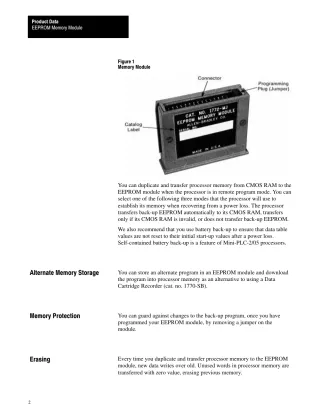
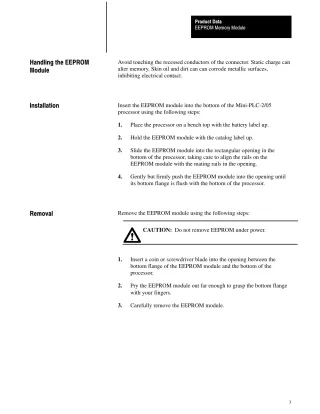
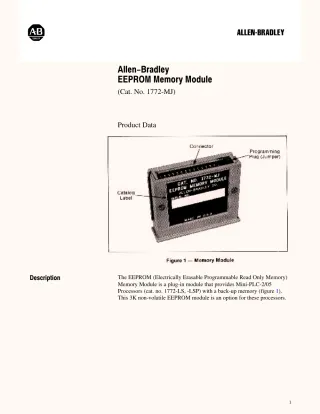
Allen-Bradley product data for the 1772-MJ EEPROM Memory Module, a plug-in 3K non-volatile back-up memory for Mini-PLC-2/05 processors (1772-LS, -LSP). It describes how the module backs up and restores processor memory, storing an alternate program, memory protection with a jumper, handling, installing and removing the module, programming it with the MEMORY STORE switch, downloading a program, and the backplane switch settings that select memory transfer at power-up.
Its parts
- Description
- Alternate Memory Storage
- Memory Protection
- Erasing
- Handling the EEPROM Module
- Installation
- Removal
- EEPROM Programming
- MEMORY STORE Switch
- EEPROM Downloading
- Backplane Switch Settings
From the manual · read page by page
Key facts from this manual
Each line names its page in the PDF.
Product data sheet for the Allen-Bradley 1772-MJ EEPROM memory module, a plug-in back-up memory for Mini-PLC-2/05 processors (1772-LS, -LSP). It explains installing and removing the module, copying the processor program into it, and loading a stored program back into the processor.
- Module type
- Plug-in 3K non-volatile EEPROM back-up memory module p. 1
- Processors
- Mini-PLC-2/05 processors 1772-LS and 1772-LSP p. 1
- Storing a program
- Copied from processor CMOS RAM with the MEMORY STORE switch, processor in remote program mode p. 4, 5
- Write protection
- Programming plug (jumper) on the module; remove it to guard against changes p. 4
- Power-up modes
- Always transfer EEPROM to CMOS RAM, transfer only if CMOS RAM is invalid, or never transfer p. 2
- Mode selection
- Switches 6 and 7 on the I/O chassis backplane p. 6
- Alternate programs
- An EEPROM can hold an alternate program, an alternative to the 1770-SB Data Cartridge Recorder p. 2
- Erasing
- Each store overwrites old data; unused words are written as zero p. 2
- Related parts
- 1771-BB Auxiliary Battery Pack with 1772-CD Mini-Processor Transport Cable; 1771-P3, -P4, -P5 power supply modules p. 4
- Store failure
- Red PROC FAULT on the processor stays on; reset by cycling power p. 5
What this manual walks you through
- Installing the EEPROM module in the bottom of the processor p. 3
- Removing the EEPROM module p. 3
- Copying the ladder program from the processor into the EEPROM p. 4, 5
- Write-protecting a programmed module and labeling it p. 5
- Loading a program from another EEPROM module into the processor p. 6
- Setting backplane switches for the power-up memory transfer p. 6
Good to know
- Do not remove the EEPROM module while power is on. p. 3
- Avoid touching the recessed connector conductors: static can alter memory and skin oil can corrode contacts. p. 3
- Back up processor memory with a battery before turning off power, or the memory may be lost. p. 4
- The MEMORY STORE switch does nothing without an EEPROM installed, or in remote test or run/program mode. p. 5
- Battery back-up is recommended so data table values are not reset after a power loss. p. 2
Questions this manual answers
Which processors take the 1772-MJ memory module?
Mini-PLC-2/05 processors, catalog numbers 1772-LS and 1772-LSP. p. 1
How much memory does the 1772-MJ hold?
It is a 3K non-volatile EEPROM module. p. 1
How do I save the processor program to the 1772-MJ?
With the programming jumper fitted and the processor in remote program mode, hold the MEMORY STORE switch ON until the green PROC RUN indicator turns on. p. 4, 5
What if the red PROC FAULT light comes on while storing to the EEPROM?
The module could not accept the program. Cycle power to reset the fault, check that the programming plug is fitted, and replace the module if necessary. p. 5
How do I make the processor load its program from the EEPROM at power-up?
Set switch 6 of the switch assembly on the I/O chassis backplane to OFF, which makes the processor load its memory from the EEPROM unconditionally. p. 6
Contents
Chapters and sections
Each line opens the PDF at its page.
The whole text · 1 part
Read the manual here as text
Its text as extracted from the PDF, unedited, in parts; each page opens the PDF at that page.
The file