Spec sheet · Allen-Bradley
PowerFlex 20-HIM-A3/-A5/-C3S/-C5S Series C HIM Firmware 6.001 Release Note
Spec sheet8 pagesPDF 457 KB
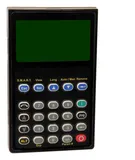
Release note for firmware 6.001 of the PowerFlex 20-HIM-A3, -A5, -C3S and -C5S Series C Human Interface Modules.
Covers · 1 model
The models it covers
Summary
What is in it
Rockwell Automation's release note for firmware 6.001 of the PowerFlex 20-HIM-A3/-A5/-C3S/-C5S Series C HIM (Human Interface Module). It lists the enhancements in this revision, explains how to read the HIM firmware revision from the HIM itself, DriveExplorer or DriveExecutive, and gives step-by-step firmware update procedures using DriveExplorer, DriveExecutive, ControlFLASH or HyperTerminal, followed by restrictions and the compatible revisions of the related tools.
Its parts
- Introduction
- Enhancements
- Corrected Anomalies
- Determining Firmware Revision
- Firmware Updating
- Restrictions
- Compatible Revisions
- Rockwell Automation Support
- Product Satisfaction Return
From the sheet · read page by page
Key facts from this sheet
Each line names its page in the PDF.
Release note for firmware 6.001 of the PowerFlex 20-HIM-A3/-A5/-C3S/-C5S Series C HIM (Human Interface Module). It lists what the revision adds, shows how to read the installed firmware revision on the HIM or in Rockwell software, and walks through flashing the update.
- Document
- Release note for HIM firmware 6.001 (major revision 6, minor revision 1) p. 1
- Hardware series
- Firmware 6.001 loads only into a Series C HIM, not Series A or Series B p. 1
- Older firmware
- Firmware 5.001 or earlier does not work in a Series C HIM p. 1
- Compatible drives
- Allen-Bradley DPI drives (PowerFlex 7-Class) or Reliance Electric DPI drives p. 1
- Fault display
- LCD backlight can flash on a fault or alarm, set by Parameters 5 [Fault Dspy Type] and 6 [Alarm Dspy Type] p. 1
- Preload Reference Event
- Added for bumpless transfer with PowerFlex 700VC and PowerFlex 700H drives p. 1
- Update converter
- Updating only through a 1203-USB or 1203-SSS converter p. 4
- Update software
- DriveExplorer, DriveExecutive, ControlFLASH or HyperTerminal p. 5
- Flash kit
- PowerFlex 7-Class HIM Series C flash kit, which also installs ControlFLASH p. 5
- Flash files
- 20-HIM-Ax BOOT 3.001.04.bin, then 20-HIM-Ax APP 6.001.07.bin, sent by Xmodem p. 7
- Ethernet check
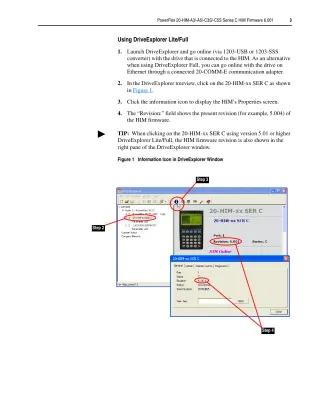
- DriveExplorer Full can read the revision over Ethernet through a 20-COMM-E adapter p. 3
- Circuit board
- Series C has a redesigned, simplified circuit board p. 1
- Publication
- 20HIM-RN008A-EN-P, December 2011 p. 8
What this sheet walks you through
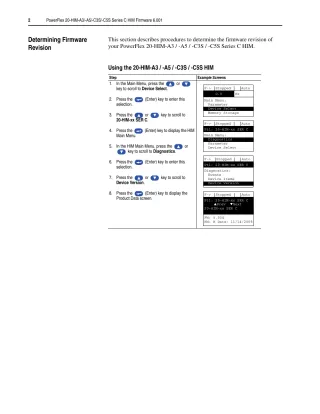
- Reading the firmware revision on the HIM keypad p. 2
- Reading the firmware revision in DriveExplorer p. 3
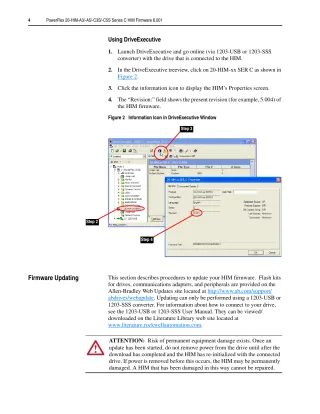
- Reading the firmware revision in DriveExecutive p. 4
- Installing the flash kit p. 5
- Updating the firmware with DriveExplorer p. 5
- Updating the firmware with DriveExecutive p. 5, 6
- Updating the firmware with ControlFLASH p. 6
- Updating the firmware with HyperTerminal over Xmodem p. 6, 7
Good to know
- Removing drive power before the download finishes and the HIM re-initializes can permanently damage the HIM beyond repair. p. 4
- The update may return HIM parameters to their defaults; the document suggests saving the configuration first, for example with CopyCat. p. 5
- The drive faults during an update if it is receiving control I/O, so make sure it has stopped safely first. p. 7
- Keep the HIM powered for 15 seconds after the update completes or until it re-initializes with the drive. p. 7
- With HyperTerminal, the transfer must start within one minute after the letter C appears. p. 6
Questions this sheet answers
Can firmware 6.001 go into a Series B 20-HIM-A3?
No. Firmware 6.001 loads only into a Series C HIM and does not work with Series A or Series B. p. 1
What do I need to connect to update the 20-HIM-A3 firmware?
A 1203-USB or 1203-SSS converter; updating cannot be done any other way. p. 4
How do I see the firmware version on the 20-HIM-A3?
From the Main Menu go to Diagnostics, then Device Version, and press Enter to show the Product Data screen. p. 2
Does the Series C HIM work with Reliance Electric drives?
Yes. It is brand-neutral and works with Allen-Bradley PowerFlex 7-Class or Reliance Electric DPI drives. p. 1
What happens if power is lost during a HIM firmware update?
The HIM may be permanently damaged, and a HIM damaged this way cannot be repaired. p. 4
Contents
Chapters and sections
Each line opens the PDF at its page.
- PowerFlex 20-HIM-A3/-A5/-C3S/-C5S Series C HIM Firmware 6.001 Release Note1
- Introduction1
- Enhancements1
- Corrected Anomalies1
- Determining Firmware Revision2
- Firmware Updating4
- Restrictions7
- Compatible Revisions8
- Rockwell Automation Support8
- Product Satisfaction Return8
- Back Page / Publication 20HIM-RN008A-EN-P December 20118
The whole text · 1 part
Read the sheet here as text
Its text as extracted from the PDF, unedited, in parts; each page opens the PDF at that page.
The file