Manual · Koyo
DL330/DL330P/DL340 CPU Specifications
Manual22 pagesPDF 480 KB
DL305 user manual chapter with specifications, memory options, setup and installation for the DL330, DL330P and DL340 CPUs.
What this file really is
The old site listed this file as a manual for the Koyo 305-01N, 325-07 and 3 more models. This is one chapter (CPU specifications for the DL330, DL330P and DL340) of the DL305 User Manual, and it does not name the 325-07 or 305-01N.
Filed with · 5 models
Also filed with these models on the old site
Summary
What is in it
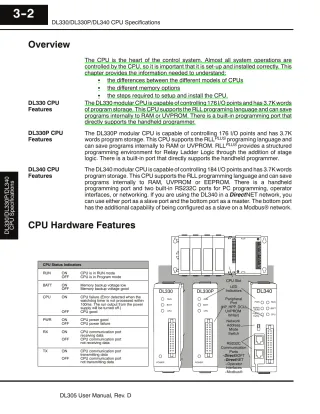
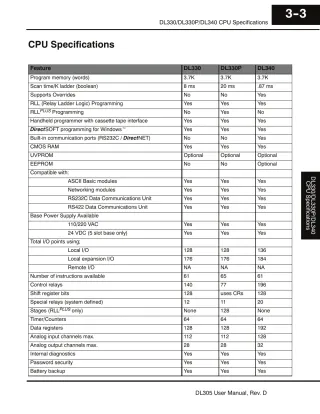
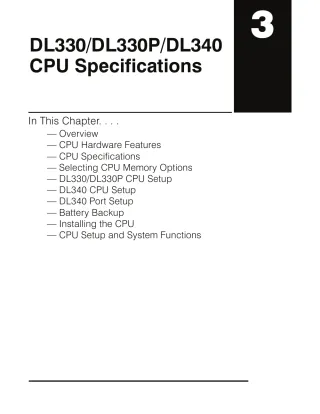
The CPU chapter of the DL305 User Manual (Rev. D), covering the DL330, DL330P and DL340 modular CPUs. It explains the differences between the models, their status indicators and a side-by-side specification table, memory options (CMOS RAM, UVPROM and EEPROM, plus retentive memory), dipswitch setup for each CPU, DL340 communication port setup, battery backup, installing the CPU, and CPU setup and system functions.
Its parts
- Overview
- CPU Hardware Features
- CPU Specifications
- Selecting CPU Memory Options
- DL330/DL330P CPU Setup
- DL340 CPU Setup
- DL340 Port Setup
- Battery Backup
- Installing the CPU
- CPU Setup and System Functions
From the manual · read page by page
Key facts from this manual
Each line names its page in the PDF.
The CPU chapter of the DL305 User Manual, Rev. D, covering the DL330, DL330P and DL340 CPUs; it does not print the 325-07 or 305-01N designations the site files it under. It compares the three CPUs and explains memory options, UVPROM and EEPROM use, DL340 port setup, battery replacement, installation, and connecting a programming device.
- Type
- Modular CPUs for the DL305 PLC: DL330, DL330P and DL340 p. 2
- I/O capacity
- DL330 and DL330P: 176 I/O points; DL340: 184 I/O points p. 2
- Program memory
- Up to 3.7K words on all three CPUs p. 5
- Program storage
- CMOS RAM standard; UVPROM optional; EEPROM optional on the DL340 only p. 5
- Programming language
- DL330 and DL340: RLL; DL330P: RLL PLUS with stage logic p. 2
- Scan time per K ladder
- DL330: 8 ms; DL330P: 20 ms; DL340: .87 ms (boolean) p. 3
- DL340 ports
- DL340: two built-in RS232C ports for PC programming, operator interfaces or networking p. 2
- DL340 Port 2 protocols
- DL340: DirectNET slave, master or peer (addresses 1-90) or Modbus RTU (1-247) p. 13
- DL340 baud rate
- DL340 Port 1: 300 to 38400 baud, set with SW1 switches 3, 4 and 5; Port 2 set in R773 p. 12
- DL330/DL330P networking
- DL330 and DL330P: through a Data Communications Unit, D3-232-DCU (RS232C) or D3-422-DCU (RS422) p. 9
- Memory battery
- Lithium, part D3-04-BATT; typical life five years p. 14
- Handheld programmers
- D3-HP for the DL330 or DL340; D3-HPP for the DL330P only; cable D3-HPCBL, about 4.5 feet (1.5m) p. 18
- PROM Writer Unit
- D3-PWU copies the program between CPU RAM and a UVPROM p. 5, 6
- Data registers
- DL330 and DL330P: 128; DL340: 192 p. 3
What this manual walks you through
- Installing a UVPROM or EEPROM in the CPU p. 9, 10
- Selecting retentive memory with the dipswitches p. 9, 11
- Setting the DL340 baud rate and network address p. 12
- Setting DL340 station type, response delay, data format and parity p. 13
- Replacing the CPU battery p. 14
- Installing the CPU in the base p. 15
- Connecting a handheld programmer or PC p. 18, 19
- Changing between RUN and PGM modes p. 20
- Clearing the CPU memory before a new program p. 21
Good to know
- If the battery is missing or its connector is not seated, the indicator will not warn of it. p. 14
- After removing power, wait about 60 seconds for the capacitor to discharge before removing the CPU. p. 9
- Connecting the Handheld Programmer switches the CPU to the mode set on its keyswitch. p. 20
- Clearing memory with the Handheld Programmer clears only the program, not the data registers. p. 21
- Selecting parity for DL340 Port 2 needs firmware V2.7 or later. p. 13
Questions this manual answers
What battery does the DL330 or DL340 CPU use?
A lithium battery, part D3-04-BATT, with a typical life of five years. p. 14
How many I/O points can a DL340 CPU control?
184 I/O points; the DL330 and DL330P control 176. p. 2
How do I connect a DL330 to a PC running DirectSOFT?
Through a Data Communications Unit, RS232C (D3-232-DCU) or RS422 (D3-422-DCU). DCUs can also link the DL305 to an operator interface or network. p. 9, 18
Which handheld programmer works with the DL330P?
Only the D3-HPP, which supports the RLL PLUS features. The D3-HP serves the DL330 or DL340. p. 18
How do I erase a UVPROM?
Expose its uncovered window to ultraviolet light; a typical exposure is a 12,000μ w/cm2 lamp at 2.5 cm for 15-20 minutes. p. 8
Contents
Chapters and sections
Each line opens the PDF at its page.
The whole text · 3 parts
Read the manual here as text
Its text as extracted from the PDF, unedited, in parts; each page opens the PDF at that page.
The file