Spec sheet · Toshiba
Toshiba EX100 Programmable Controller
Spec sheet9 pagesPDF 1.4 MB
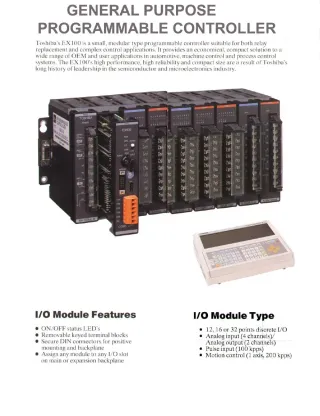
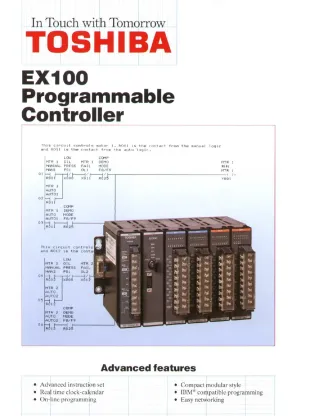
Product brochure for the Toshiba EX100 modular programmable controller, its racks, CPUs, I/O modules such as the EX10-MDO31, and programmers.
What this file really is
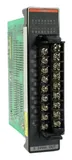
The old site listed this file as a spec sheet for the Toshiba EX10-MDO31 / DO31. Filed as an EX10-MDO31 specsheet, this is a brochure for the whole Toshiba EX100 programmable controller family, where the MDO31 appears only in the I/O module tables.
Filed with · 1 model
Also filed with these models on the old site
Summary
What is in it
A Toshiba brochure for the EX100, a small modular programmable controller for relay replacement and complex control. It describes the racks, standard and enhanced CPU modules, power supplies, I/O module features, programming software and instruction set, the HP-100 and GP110 programmers, EX-PDD software and PAL, followed by general and functional specifications, a table of I/O modules including the EX10-MDO31 transistor output module, part numbers and external dimensions.
From the sheet · read page by page
Key facts from this sheet
Each line names its page in the PDF.
A product brochure for the Toshiba EX100 programmable controller, a small modular PLC system. The site files it under the EX10-MDO31 I/O module, which appears only in its part number lists. It gives the system's general and functional specifications, instruction set, programming tools and part numbers for racks, CPUs, power supplies and I/O modules.
- Type
- Small modular programmable controller for relay replacement and complex control p. 2
- Power supply types
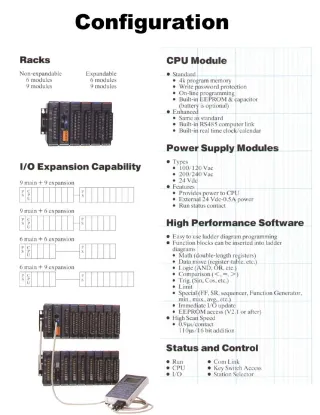
- 100/120 Vac, 200/240 Vac or 24 Vdc p. 3
- Power consumption
- Less than 50 VA (ac supply); less than 22 W (dc supply) p. 6
- Program memory
- 4k program, or 3k program plus 1k retentive data registers; EEPROM and RAM p. 6
- Memory backup
- Built-in capacitor (7 days at 25 °C); optional battery (2 years at 25 °C) p. 6
- CPU types
- Standard, or Enhanced with built-in RS485 computer link and real time clock/calendar p. 3
- Racks
- 6-module or 9-module racks, non-expandable or expandable; up to 9 main + 9 expansion p. 3
- Discrete I/O capacity
- 480 points with 32-point modules p. 6
- Execution speed
- 0.9 µs per contact; 110 µs per 16-bit addition p. 6
- Program language
- Ladder diagrams with function blocks p. 6
- Power supply output
- External 24 Vdc 0.5 A power and a run status contact p. 3
- Temperature
- 0 to 55 °C operating; -20 to 75 °C storage p. 6
- Humidity
- 20 to 90% RH, no condensation p. 6
- Programming tools
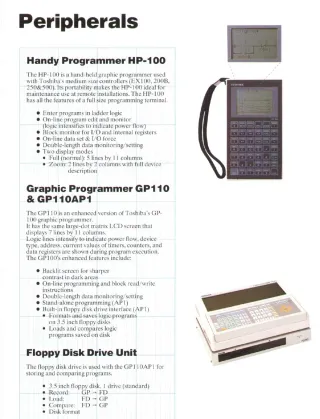
- HP-100 handy programmer, GP110 graphic programmer, EX-PDD PC software p. 4, 5
What this sheet walks you through
- Choosing racks, CPU type and expansion layout p. 3
- Programming and monitoring with the HP-100 handheld programmer p. 4
- Storing and comparing programs on 3.5 inch floppy disk with the GP110AP1 p. 4
- Writing and documenting programs on a PC with EX-PDD p. 5
- Linking personal computers to controllers with PAL p. 5
- The instruction set: ladder, data, arithmetic, compare and special functions p. 7
- Part numbers for racks, power supplies, CPUs, peripherals and I/O modules p. 8
Good to know
- Some instructions, such as EEPROM read/write and clock-calendar data setting, need CPU version 2.1 or later. p. 7
- The clock-calendar and computer link come with the enhanced CPU type. p. 6
Questions this sheet answers
What power supply voltages does the Toshiba EX100 take?
Its power supply modules come in 100/120 Vac, 200/240 Vac and 24 Vdc types. p. 3
How long does the EX100 keep its memory without power?
The built-in capacitor backs up RAM for 7 days at 25 °C; an optional battery lasts 2 years at 25 °C. p. 6
How do I program a Toshiba EX100?
With the HP-100 handheld programmer, the GP110 graphic programmer, or EX-PDD software on an IBM PC or compatible. p. 4, 5
What is the EX100 operating temperature range?
0 to 55 °C in operation and -20 to 75 °C in storage. p. 6
Is the EX10*MDO31 an EX100 module?
The brochure lists part number EX 10*MD031 in its EX100 I/O Modules table. p. 7
Contents
Chapters and sections
Each line opens the PDF at its page.
The whole text · 1 part
Read the sheet here as text
Its text as extracted from the PDF, unedited, in parts; each page opens the PDF at that page.
The file