Manual · Allen-Bradley
1771-DB Basic Module User Manual
Manual167 pagesPDF 943 KB
User manual for the Allen-Bradley 1771-DB BASIC Module: installation, serial ports, BASIC-52 commands and block-transfer programming.
What this file really is
The old site listed this file as a manual for the Allen-Bradley 1771-DA and 1771-DB. The file is named for the 1771-DA, but the document is the user manual for the 1771-DB BASIC Module and does not mention the 1771-DA.
Names · 1 model
The models it names
Filed with · 1 model
Also filed with these models on the old site
Summary
What is in it
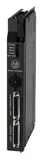
Allen-Bradley user manual for the 1771-DB BASIC Language Module, a one-slot 1771 I/O module that adds BASIC programming, math functions and report generation to processors that use block-transfer. It covers the hardware and specifications, installation, configuration plugs and battery, the program and peripheral serial ports and the terminals, recorders and printers they connect to, every BASIC command, statement and CALL routine, block-transfer with PLC-2, PLC-3 and PLC-5 processors, data types, editing and error messages.
Its parts
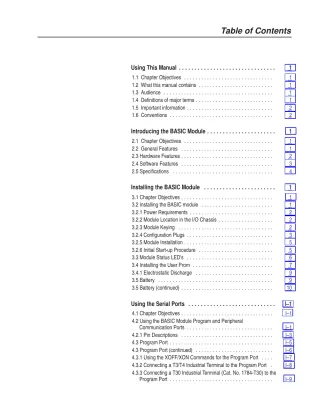
- Using This Manual
- Introducing the BASIC Module
- Installing the BASIC Module
- Using the Serial Ports
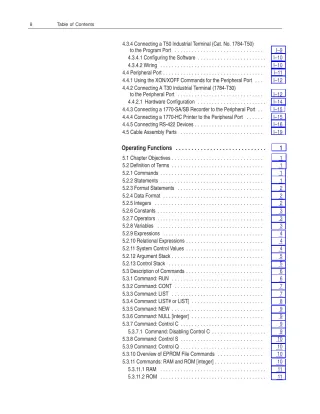
- Operating Functions
- Programming
- Data Types
- Editing A Procedure
- Error Messages and Anomalies
From the manual
Key facts from this manual
Some pages are scans or cannot be read; this says only what the readable text supports. Each line names its page in the PDF.
This Allen-Bradley user manual covers the 1771-DB BASIC Module, a one-slot 1771 I/O module that runs BASIC-52 programs and trades data with PLC-2, PLC-3 and PLC-5 processors by block-transfer. The 1771-DA is not named in it. It explains installation, configuration plugs, the program and peripheral serial ports, the battery and EPROM, the BASIC commands and CALL routines, and the error messages.
- Device
- BASIC language module adding math, report generation and BASIC-52 programming to a 1771 I/O system p. 11
- Processors
- Block-transfer with PLC-2, PLC-3 or PLC-5 family processors p. 11
- Memory
- 13 K bytes battery backed RAM; 32 K bytes EPROM p. 12
- Serial ports
- PROGRAM port RS-423A/232C; PERIPHERAL port RS-423A/232C/RS-422 p. 12, 13
- Port speeds
- 300 baud to 19.2K baud, default 1200 baud; ports isolated up to 500 V p. 25
- Power
- 1.5 A at +5V DC from the 1771 I/O chassis backplane p. 16
- Chassis slot
- One slot, any I/O slot except the extreme left p. 12, 16
- Battery
- About 2000 hours with no power, about 20,000 hours shelf life; about three days after BAT LOW p. 23
- EPROM
- JEDEC 8 K, 16 K or 32 K byte, 12.5V DC programming; 32 K byte parts 940654-02 or 9406454-03 p. 21
- Cable parts
- DB-25S and DB-25P connectors, Amp 205718-1 hood, 1778-CR or Belden 8723 cable (not for RS-422) p. 37
- Clocks
- Real-time clock with 5 ms resolution; wall clock/calendar with 1 second resolution p. 11
- Programs
- One program in RAM and up to 255 in EPROM, depending on size p. 14
- Temperature
- Operating 0°C to 60°C; storage -40°C to 85°C p. 14
- Keying
- Keying bands between 8 and 10 and between 32 and 34 on the upper backplane connector p. 16
What this manual walks you through
- Installing the module in a 1771 I/O chassis p. 15, 16, 19
- Setting configuration plugs for PROM size, peripheral baud rate and RS-422 termination p. 17
- First power-up with a terminal at 1200 baud p. 19, 20
- Reading the status LEDs and troubleshooting the FLT LED p. 20, 21
- Replacing the user EPROM p. 22
- Replacing the battery without removing the module p. 23
- Wiring the program and peripheral port pins p. 26
- Connecting RS-422 devices with termination resistors p. 36
- Checking the battery with CALL 80 p. 130
- Understanding BASIC and CALL routine error messages p. 153, 154, 155
Good to know
- Do not insert or remove modules while system power is on. p. 16
- Ground the system before power-up; a ground potential difference at the serial connectors can damage equipment or lose programs. p. 19
- Using the peripheral port as an RS-422 port requires pin 4 connected to pin 5. p. 36
- A PROGRAMMING error while burning an EPROM destroys its file structure; no more programs can be saved on it. p. 155
- The factory-set configuration plugs must not be reset. p. 18
Questions this manual answers
How much power does the 1771-DB BASIC Module draw?
1.5 A at +5V DC from the 1771 I/O chassis backplane, with no external supply needed. p. 16
What baud rate does the 1771-DB program port use at first?
1200 baud. CALL 78 changes the program port baud rate. p. 12
How long does the 1771-DB battery last?
About 2000 hours without power and about 20,000 hours on the shelf; after BAT LOW it keeps data about three days. p. 23
Which EPROMs fit the 1771-DB?
JEDEC standard 8 K, 16 K or 32 K byte EPROMs using 12.5V DC programming voltage. p. 21
What does the BAT LOW LED mean on the 1771-DB?
The battery voltage has dropped below about 3.0V DC. p. 20
Contents
Chapters and sections
Each line opens the PDF at its page.
- 1771-6.5.34, 1771–DB Basic Module, User Manual1
- 1 - Using This Manual9
- 2 - Introducing the BASIC Module11
- 3 - Installing the BASIC Module15
- 4 - Using the Serial Ports25
- 5 - Operating Functions38
- 6 - Programming133
- 7 - Data Types143
- 8 - Editing A Procedure149
- 9 - Error Messages and Anomalies153
- A - Quick Reference Guide162
- B - Decimal/Hexadecimal/Octal/ASCII Conversion Table164
- C - Basic Module Programming Hints166
- Back Cover167
The whole text · 17 parts
Read the manual here as text
Its text as extracted from the PDF, unedited, in parts; each page opens the PDF at that page.
- Pages 1 to 101-10
- Pages 11 to 2011-20
- Pages 21 to 3021-30
- Pages 31 to 4031-40
- Pages 41 to 5041-50
- Pages 51 to 6051-60
- Pages 61 to 7061-70
- Pages 71 to 8071-80
- Pages 81 to 9081-90
- Pages 91 to 10091-100
- Pages 101 to 110101-110
- Pages 111 to 120111-120
- Pages 121 to 130121-130
- Pages 131 to 140131-140
- Pages 141 to 150141-150
- Pages 151 to 160151-160
- Pages 161 to 167161-167
The file