Manual · AutomationDirect
Appendix B: DL05 Error Codes
Manual8 pagesPDF 67 KB
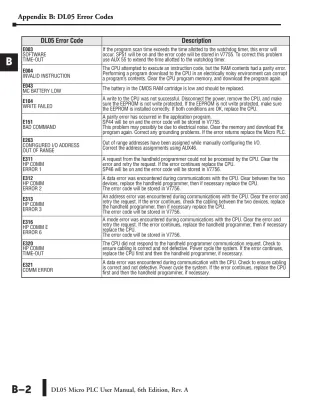
Error code table for the DL05 Micro PLC (Appendix B of the DL05 User Manual), listing CPU, program and handheld programmer errors.
Filed with · 1 model
Also filed with these models on the old site
Summary
What is in it
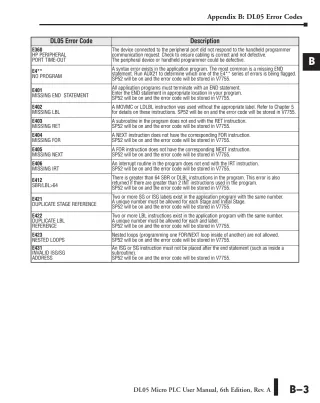
Appendix B of the DL05 Micro PLC User Manual: a table of every DL05 error code with its name and what to do about it. It covers CPU errors such as software time-out and write failures, handheld programmer communication errors, program syntax errors in the E4xx series (missing END, labels, loops, stack overflow, duplicate references), handheld programmer entry and mode errors, password errors and EEPROM transfer errors, and notes the special relays and V-memory locations where codes are stored.
Its parts
- DL05 Error Codes
- Error Codes Table
From the manual · read page by page
Key facts from this manual
Each line names its page in the PDF.
Appendix B of the DL05 Micro PLC User Manual (6th Edition, Rev. A): the table of DL05 error codes, which applies to the DL05 family as a whole rather than naming one model. Each code is listed with its name, its cause and, for many, the corrective step.
- Document
- Error code table from the DL05 Micro PLC User Manual, 6th Edition, Rev. A p. 2
- E003 Software time-out
- Scan time exceeded the watchdog timer; SP51 on, code in V7755; extend the watchdog time with AUX 55 p. 2
- E004 Invalid instruction
- RAM parity error; clear the CPU program memory and download the program again p. 2
- E043 MC battery low
- The battery in the CMOS RAM cartridge is low and should be replaced p. 2
- E104 Write failed
- Check that the EEPROM is not write protected and is installed correctly; otherwise replace the CPU p. 2
- E151 Bad command
- Parity error in the application program, possibly from noise; SP44 on, code in V7755; reload and fix grounding p. 2
- E263 Address out of range
- Out of range addresses in manual I/O configuration; correct them with AUX46 p. 2
- E311 to E321
- Handheld programmer communication errors; most store the code in V7756 p. 2
- E320 HP comm time-out
- CPU did not answer the handheld programmer; check cabling, power cycle, then replace the CPU or programmer p. 2
- E4** No program
- Syntax error in the program, most often a missing END; run AUX21 to see which E4** error; SP52 on, code in V7755 p. 3
- E461 Stack overflow
- More than nine levels of logic on the stack; check OR STR and AND STR use p. 5
- E505 Invalid instruction
- Includes a program needing the D0-01MC Memory Cartridge placed in RUN without it p. 6
- E525 Mode switch
- Handheld programmer operation tried while the CPU mode switch was not in TERM p. 6
- E650 to E652
- Handheld programmer system, ROM or RAM error; power cycle it, and replace it if the error returns p. 7
What this manual walks you through
- CPU, memory and handheld programmer communication errors (E003 to E360) p. 2, 3
- Program syntax errors such as missing END, RET or NEXT (E4** series) p. 3, 4, 5
- Handheld programmer entry and mode errors (E501 to E542) p. 6
- Memory, search and EEPROM transfer errors (E601 to E652) p. 6, 7
Good to know
- Downloading a program in an electrically noisy environment can corrupt it. p. 2
- Nested FOR/NEXT loops are not allowed (E423). p. 3
- More than 64 SBR or DLBL instructions, or more than 2 INT instructions, raises E412. p. 3
- Subroutines, RTC, RT and similar blocks must be placed after the END statement. p. 4
Questions this manual answers
What does error E003 mean on a DL05 PLC?
Software time-out: the scan took longer than the watchdog timer allows. Use AUX 55 to extend the watchdog time. p. 2
How do I fix DL05 error E401?
E401 means the program has no END statement; enter END at the right place in the program. p. 3
What does DL05 error E043 mean?
MC battery low: the battery in the CMOS RAM cartridge is low and should be replaced. p. 2
What does E151 BAD COMMAND mean on a DL05?
A parity error in the application program, possibly from electrical noise. Clear memory, download again and correct grounding; if it returns, replace the Micro PLC. p. 2
Why does the handheld programmer show E525?
An operation was tried while the CPU mode switch was in a position other than TERM. p. 6
Contents
Chapters and sections
Each line opens the PDF at its page.
The whole text · 1 part
Read the manual here as text
Its text as extracted from the PDF, unedited, in parts; each page opens the PDF at that page.
The file