Manual · Parker Hannifin
Appendix B. EVM32 Installation (6K Hardware Installation Guide)
Manual7 pagesPDF 740 KB
Installation appendix for the EVM32 expansion I/O bricks for 6K controllers: SIM boards, jumpers, specifications and wiring.
Names · 1 model
The models it names
Filed with · 1 model
Also filed with these models on the old site
Summary
What is in it
Appendix B of the 6K Hardware Installation Guide, covering the EVM32 family of DIN-rail I/O bricks that add I/O to 6K controllers. It describes the EVM32-BASE baseboard and the digital input, digital output and analog input SIM boards, full specifications, installing SIM boards, setting the sinking or sourcing jumpers, and wiring the bricks to the 6K, the 12-24VDC power input and each type of I/O.
Its parts
- EVM32 Description
- Specifications
- Installing the SIM Boards
- Setting Jumpers
- Electrical Connections
From the manual · read page by page
Key facts from this manual
Each line names its page in the PDF.
Appendix B of the 6K Hardware Installation Guide, covering the EVM32 expansion I/O bricks sold as accessories to the 6K Controllers: the EVM32-BASE baseboard and its SIM8-IN, SIM8-OUT-EVM32 and SIM8-AN-IN boards. It gives ordering part numbers and specifications, and shows how to fit the SIM boards, set the sinking or sourcing jumpers and wire power and digital and analog I/O.
- Device
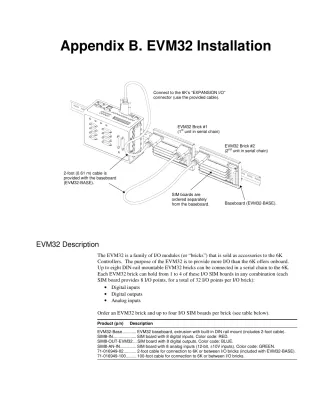
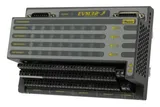
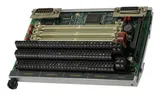
- Expansion I/O brick for 6K Controllers: baseboard holding 1 to 4 SIM boards of 8 I/O points, 32 points per brick p. 1
- Bricks per 6K
- Up to eight DIN-rail mountable bricks in a serial chain from the 6K EXPANSION I/O connector p. 1
- SIM boards
- SIM8-IN 8 digital inputs (red); SIM8-OUT-EVM32 8 digital outputs (blue); SIM8-AN-IN 8 analog inputs, 12-bit, ±10V (green) p. 1
- Cables
- 71-016949-02 2-foot cable (included with EVM32-BASE); 71-016949-100 100-foot cable p. 1
- Power
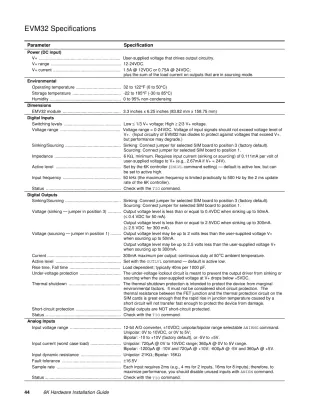
- V+ 12-24VDC; 1.5A @ 12VDC or 0.75A @ 24VDC, plus the load current of sourcing outputs p. 2, 4
- Digital inputs
- 0-24VDC; low at 1/3 V+ or less, high at 2/3 V+ or more; 6 KΩ minimum impedance p. 2
- Digital outputs
- 300mA maximum per output, continuous at 50°C; not short-circuit protected p. 2
- Analog inputs
- 12-bit; unipolar 0V to 10VDC or 0V to 5V, bipolar -10 to +10V (default) or -5V to +5V; 2ms per input p. 2
- Sink/source jumper
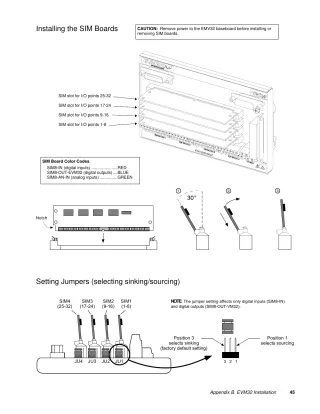
- Position 3 sinking (factory default), position 1 sourcing; affects digital SIM boards only p. 2, 3
- SIM slots
- SIM1 points 1-8, SIM2 9-16, SIM3 17-24, SIM4 25-32 p. 3
- Input frequency
- 50 kHz, limited in practice to 500 Hz by the 6K's 2 ms update rate p. 2
- 6K commands
- TIO for status; INLVL and OUTLVL set active levels; ANIRNG sets analog range; ANIEN disables unused analog inputs p. 2
- Environment
- Operating 32 to 122°F (0 to 50°C); storage -22 to 185°F (-30 to 85°C); 0 to 95% humidity non-condensing p. 2
- Dimensions
- 3.3 x 6.25 inches (83.82 x 158.75 mm) p. 2
What this manual walks you through
- Ordering a brick and its SIM boards p. 1
- Installing SIM boards in their slots p. 3
- Setting the sinking or sourcing jumpers p. 3
- Connecting bricks to the 6K controller and to each other p. 4
- Wiring the 12-24VDC power input p. 4
- Wiring sinking and sourcing digital inputs p. 5
- Wiring sinking and sourcing digital outputs p. 6
- Wiring analog inputs p. 7
Good to know
- Digital outputs are not short-circuit protected, and the thermal shutdown must not be treated as short-circuit protection. p. 2
- If a brick is disconnected or loses power, the 6K performs a kill of all tasks and sets error bit #18. p. 4
- Remove power from the 6K and the baseboard before connecting or disconnecting bricks, SIM boards or I/O. p. 3, 4
- Drive inductive loads with an external diode connected in parallel to the load. p. 6
- Input signal voltage should not exceed V+; protection diodes are fitted but performance may degrade. p. 2
Questions this manual answers
How many EVM32 I/O bricks can connect to a 6K controller?
Up to eight, linked in a serial chain from the 6K's EXPANSION I/O connector. p. 1
Which cable connects an EVM32 to a 6K?
The 2-foot 71-016949-02, included with the EVM32-BASE; a 100-foot 71-016949-100 is also listed. p. 1
Are EVM32 digital outputs short-circuit protected?
No. Each output handles up to 300mA, but none are short-circuit protected. p. 2
What happens if an EVM32 brick loses power?
The 6K controller performs a kill of all tasks and sets error bit #18; the TIO command checks brick status. p. 4
Contents
Chapters and sections
Each line opens the PDF at its page.
The whole text · 1 part
Read the manual here as text
Its text as extracted from the PDF, unedited, in parts; each page opens the PDF at that page.
The file