Manual · ABB
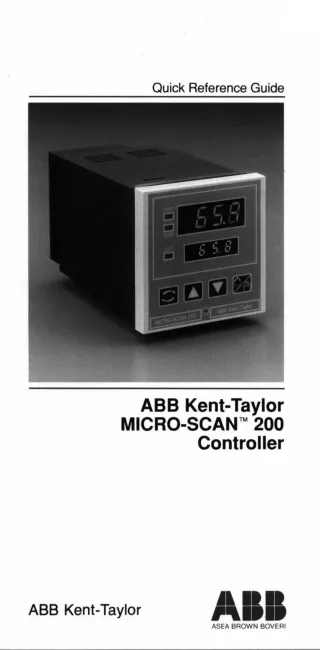
MICRO-SCAN 200 Controller Quick Reference Guide
Manual12 pagesPDF 351 KB
Quick reference guide for the ABB Kent-Taylor MICRO-SCAN 200 controller: display prompts, valid entries and setup levels 1 to 9.
What this file really is
The old site listed this file as a manual for the ABB Taylor Micro-Scan 200. A 12-page quick reference guide to the controller's display prompts and setup levels, not the full instruction manual.
Filed under · 1 model
Filed under these models in the old catalog
Summary
What is in it
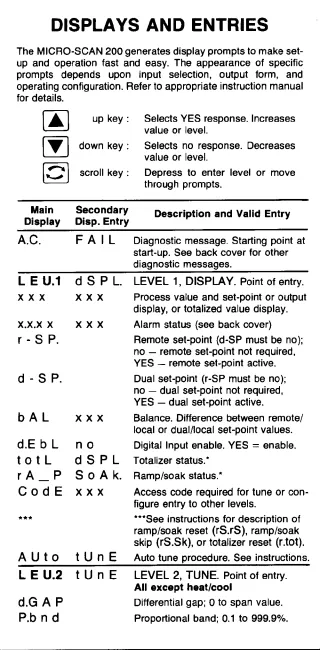
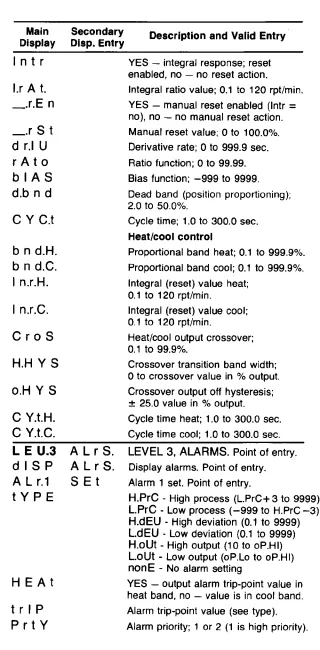
A short quick reference guide for the ABB Kent-Taylor MICRO-SCAN 200 process controller. It explains the front panel keys and lists, level by level, every display prompt and its valid entries: display, tune (PID, heat/cool), alarms and relays, high/low limits and digital input, input type and scaling, enable and passwords, remote set-point, diagnostics and calibration, RS485 communications and control type, with a chart of how the levels and loops relate.
From the manual · read page by page
Key facts from this manual
Some pages are scans or cannot be read; this says only what the readable text supports. Each line names its page in the PDF.
Quick reference guide (98356-1, 5/91) for the ABB Kent-Taylor MICRO-SCAN 200 controller. It lists the front-panel prompts level by level, from display and tuning through alarms, limits, input, enable, diagnostics, RS-485 and control setup, with their valid entries. It also lists the diagnostic and alarm messages and shows the jumper locations.
- What it is
- Process controller set up through front-panel prompts arranged in levels p. 2
- Controller types
- On/off, current, time or position proportioning, and heat/cool (dual milliamp, dual relay, milliamp/relay), restricted by hardware p. 7
- Input types
- Volt, thermocouple, RTD, millivolt, milliamp p. 7
- Input high range
- 5.00 to 20.00 mA dc, 10.0 to 150.0 mV dc, or 0.1 to 5.00V p. 5
- Output
- 4 to 20 mA direct or 20 to 4 mA reverse; 4-20 mA retransmission output p. 5, 6
- Communications
- RS485 (Level 8) p. 7
- Alarms
- Four alarm sets: high/low process, high/low deviation or high/low output; priority 1 or 2 p. 3, 4
- Relays
- Relays A, B and C; relay trips on any combination of alarm sets 1 to 4 p. 4
- Tuning ranges
- Proportional band 0.1 to 999.9%; integral 0.1 to 120 rpt/min; derivative 0 to 999.9 sec; cycle time 1.0 to 300.0 sec p. 2, 3
- Functions
- Remote or dual set-point, ramp/soak, totalizer, auto tune p. 2
- Line frequency
- 50 or 60 Hz p. 7
- Built-in tests
- Software revision display, RAM test, lamp test, temperature calibration (Level 7) p. 7
What this manual walks you through
- Reading the Level 1 display prompts p. 2
- Setting tuning values in Level 2 p. 2, 3
- Setting alarms, relays and alarm acknowledge in Level 3 p. 3, 4
- Setting output and set-point limits and digital input in Level 4 p. 4, 5
- Configuring the input in Level 5 p. 5, 6
- Enable settings in Level 6: power-up mode, control action, remote set-point p. 6
- Diagnostics and temperature calibration in Level 7 p. 7
- Choosing controller and input type in Level 9 p. 7
- Diagnostic and alarm messages p. 10
- Input and power jumper locations p. 11
Good to know
- Remote set-point and dual set-point exclude each other: each needs the other set to no. p. 2
- The controller types offered are restricted by the hardware fitted. p. 7
- Engineering units low applies only when square law is not selected. p. 5
Questions this manual answers
What does FAIL F.rtd mean on a Micro-Scan 200?
It is the diagnostic message for a failed RTD input. p. 10
What does AC. FAIL mean when the Micro-Scan 200 starts up?
It is the power failure power-up message, the starting point at start-up. p. 10
What inputs does the Micro-Scan 200 accept?
Volt, thermocouple, RTD, millivolt and milliamp inputs, chosen in Level 9. p. 7
Does the Micro-Scan 200 have serial communications?
Yes. Level 8 holds the RS485 communications settings. p. 7
The whole text · 2 parts
Read the manual here as text
Its text as extracted from the PDF, unedited, in parts; each page opens the PDF at that page.
The file