
Manual · Allen-Bradley
Discrete I/O Modules (Catalog Number 1746 Series) Installation Instructions
Manual24 pagesPDF 657 KB
Installation instructions excerpt for Allen-Bradley SLC 500 1746 discrete I/O modules, with wiring diagrams for the 1746-IA8 and others.
What this file really is
The old site listed this file as a manual for the Allen-Bradley 1746-IA8. Only a partial copy: a distributor's cover sheet, the opening pages and pages 38 to 55 (fuses, electronic protection and wiring diagrams) of the 1746 Discrete I/O Modules installation instructions.
Filed under · 1 model
Filed under these models in the old catalog
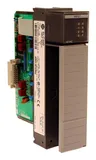
Summary
What is in it
Pages from the Allen-Bradley installation instructions for 1746 series discrete I/O modules used in SLC 500 systems, behind a distributor's data sheet cover for the 1746-IA8 (AC input, 8 point) and 1746-IOA16. It lists the input, output and combination module catalog numbers, then covers recovery from blown fuses and processor faults, fuse replacement, the electronically protected 1746-OB6EI and -OB16E, decimal and octal labeling, and wiring diagrams for the AC and DC input, output and relay modules.
From the manual · read page by page
Key facts from this manual
Each line names its page in the PDF.
Installation instructions for the 1746 Series discrete I/O modules used in SLC 500 systems, publication 1746-IN005A-US-P, behind a distributor cover sheet for the 1746-IA8 and 1746-IOA16. It lists dozens of 1746 input, output and combination modules, including the 1746-IA8, but this copy holds only the cover, the module list and the later pages on fuses, electronic protection and wiring diagrams. It lets a reader wire each module and recover from a blown output fuse or a channel shutdown.
- Module
- 1746-IA8: 8-point AC input module for 100/120V ac p. 1, 11
- 1746-IA8 terminals
- 1746-IA8: eight inputs, IN 0 to IN 7, with AC COM, fed from L1 and L2 p. 11
- Family
- 1746 Series discrete I/O for SLC 500 systems p. 3, 7
- Related AC inputs
- 1746-IA4 and 1746-IA16 at 100/120V ac; 1746-IM4, -IM8 and -IM16 at 200/240V ac p. 11, 12
- Publication
- 1746-IN005A-US-P, January 2000; supersedes 1746-5.3 p. 24
- 1746-OBP16/-OVP16 fuse
- 1746-OBP16/-OVP16: Littelfuse #322010, 10A; replacement kit 1746-F8, 5 fuses p. 6
- 1746-OAP12 fuse
- 1746-OAP12: SAN-O HQ 6.3A; replacement kit 1746-F9, 5 fuses p. 6
- Fault recovery
- When processor operation stops after an output fuse blows: replace the fuse, clear major fault bit S:1/13, return to Run Mode p. 6
- Electronic protection
- 1746-OB6EI and -OB16E: thermal cut-out per channel, auto-reset, E-Fuse LED; other channels keep running p. 8, 9
- AC outputs
- 1746-OA8 and -OA16: 100 to 240V ac triac outputs; 1746-OAP12: high current triac output p. 15, 16
- DC outputs
- 1746-OB8: 10 to 50V dc sourcing; 1746-OBP8: 20.4 to 26.4V dc sourcing; 1746-OB6EI: 10-30V dc sourcing, channel-to-channel isolated p. 16, 17
- Label kits
- 16-point modules: decimal label fitted for SLC systems; octal label kit for PLC systems p. 10
- Combination modules
- 1746-IO4, -IO8, -IO12: 100/120V ac inputs with relay outputs; 1746-IO12DC: 24V dc inputs with relay outputs p. 22, 23
What this manual walks you through
- Wiring the 1746-IA4, 1746-IA8 and 1746-IA16 AC input modules p. 11
- Wiring 200/240V ac and DC input modules p. 12, 13, 14
- Wiring AC and DC output modules p. 15, 16, 17, 18, 19
- Wiring relay output and combination input/output modules p. 20, 21, 22, 23
- Recovering from a blown fuse, processor fault or processor shutdown p. 6
- Replacing the fuse in a 1746-OBP16, -OVP16 or -OAP12 p. 7
- Diagnosing and recovering from a short circuit on the 1746-OB6EI and -OB16E p. 9
- Choosing decimal or octal labels for SLC or PLC systems p. 10
Good to know
- Never install, remove or wire modules while the chassis has power. p. 7
- The 1746-OB6EI and -OB16E are not protected against reverse polarity or AC wiring, and their protection does not replace fuses or breakers. p. 8
- To stop an overloaded 1746-OB6EI or -OB16E channel from resetting itself, an external mechanical fuse can be used. p. 9
- The wiring diagrams are examples only; not every terminal needs a device. p. 10
- The manual states the listed replacement fuses are required to keep the UL/CSA rating of the 1746-OBP16/-OVP16 and 1746-OAP12. p. 6
Questions this manual answers
How do I wire a 1746-IA8?
The wiring diagram shows 100/120V ac from L1 and L2, with inputs IN 0 to IN 7 and an AC COM terminal. p. 11
What replacement fuse does the 1746-OBP16 take?
Littelfuse #322010, 10A, sold as replacement kit 1746-F8 with 5 fuses. p. 6
How do I clear a processor fault after an SLC 500 output fuse blows?
Replace the fuse, clear major fault bit S:1/13, optionally clear the S:6 error code, and return the processor to Run Mode. p. 6
What does the E-Fuse LED on a 1746-OB16E mean?
It lights when an output channel has a short circuit or overload, provided the module has power. p. 9
The whole text · 3 parts
Read the manual here as text
Its text as extracted from the PDF, unedited, in parts; each page opens the PDF at that page.
The file