Manual · GE Fanuc
Series One PLC to Series 90-30 PLC Translator User's Manual
Manual27 pagesPDF 3.4 MB
User's manual for the GE Fanuc translator program that converts Series One PLC programs and hardware layouts to the Series 90-30 PLC.
What this file really is
The old site listed this file as “GE Fanuc Series One User Manual” for the Fanuc IC610CHS110A, IC610CPU105A and 34 more models. Linked as a GE Fanuc Series One user manual, but it is the user's manual for the Series One to Series 90-30 translator program.
Filed with · 36 models
Also filed with these models on the old site
Summary
What is in it
GE Fanuc's user's manual for a DOS translator program that helps move Series One PLC applications to the Series 90-30. From a Logicmaster 1 print file and the I/O modules in each Series One slot, it works out the 90-30 hardware and converts the program for Logicmaster 90-30. The manual covers installation, the menus for specifying the Series One configuration (CPUs and IC610 I/O modules), integration, memory usage, the algorithms used and where the programmer must step in.
Its parts
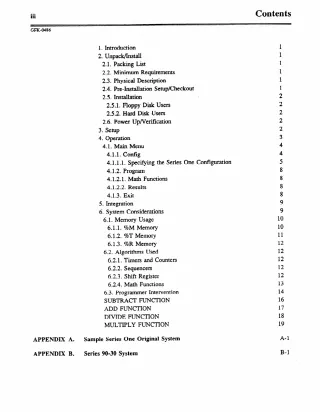
- Introduction
- Unpack/Install
- Setup
- Operation
- Integration
- System Considerations
From the manual · read page by page
Key facts from this manual
Each line names its page in the PDF.
This is the GE Fanuc user manual GFK-0486 (January 1990) for the Series One PLC to Series 90-30 PLC Translator, a DOS program that turns a Series One ladder program and rack layout into files Logicmaster 90-30 can load. It does not describe the IC610CHS110A rack or the other Series One parts the site files it under; it covers installing and running the translator, how Series One addresses map into 90-30 memory, and what must be fixed by hand afterward.
- What it is
- DOS software that converts a Series One program and rack layout for a Series 90-30 PLC p. 5
- Manual number
- GFK-0486, January 1990 p. 1
- Software version
- Version 0.10, copyright 1989 p. 7
- Computer needed
- Workmaster II, Workmaster I or 100% IBM compatible; 256K RAM; one 3.5 in floppy drive; DOS 2.0 or later p. 5
- Also needed
- Logicmaster 1 print file of the program, the Series One I/O modules by slot, and Logicmaster 90-30 on a hard disk p. 5
- Package contents
- This manual and one 3 1/2 inch floppy with 30XLAT.EXE, MODULES.DBA, EQUIV.DBA, KEYS.DBA and SAMPLE.TXT p. 5
- Output files
- .CFG configuration file, .MAP address cross-reference, and a 90-30 folder with LMFOLDER.30, KEY1.DEF and KEY2.DEF p. 12
- Input modules listed
- The discrete input menu lists IC610MDL106, IC610MDL107, IC610MDL111, IC610MDL112, IC610MDL125, IC610MDL129 and IC610MDL127 p. 10
- Slot addressing
- Each 90-30 slot starts on a 16-bit boundary: 1, 17, 33 and so on p. 13
- Coil mapping
- Series One retentive coils 340 to 377 go to %M001 to %M032; non-retentive coils 160 to 337 go to %T001 to %T112 p. 14, 15
- Accumulators
- %R301 and %R302 act as the Series One accumulator, %R303 and %R304 as the aux accumulator; timers and counters use %R319 to %R512, 3 registers each p. 16
- Flag coils
- Untranslated items are marked by coils %T249 to %T256 (XLATERR, MATH FUN, DECODE, ENCODE, BCD_BIN, BIN_BCD, D-OUT, D-STORE) p. 18
- Translation time
- About 20 seconds on a Workmaster II, over 1 minute on a Workmaster I p. 12
What this manual walks you through
- Installing the translator on a floppy or hard disk and checking the install p. 5, 6
- Entering the Series One CPU and the module in each slot p. 8, 9, 10, 11, 12
- Translating the Logicmaster 1 print file of the program p. 12
- Loading the configuration and logic into Logicmaster 90-30 with teach-in files p. 13
- How %M, %T and %R memory is assigned in the translated program p. 14, 15, 16
- How timers, counters, sequencers and shift registers are translated p. 16, 17
- Finding flagged math, BCD, encode and decode instructions and fixing them by hand p. 18, 19
- Ladder examples of Series One Plus subtract, add, divide and multiply and their 90-30 versions p. 20, 21, 22, 23
- A sample Series One system used as a tutorial p. 25
Good to know
- The translator is an aid only; the user keeps final responsibility for how the converted system runs. p. 5
- Series One Plus math (data operation) instructions need some manual work after translation. p. 5
- Boards may be moved within the rack in the 90-30 configurator, but their starting addresses must stay as assigned. p. 13
- Each Series One rung gets a comment label that uses 90-30 memory; the manual suggests deleting them once the program is debugged. p. 13
- Moves are translated as 16-bit; programs using 4 or 8 bit Series One instructions need masking and shifting added by hand. p. 19
Questions this manual answers
What computer does the Series One to Series 90-30 translator need?
A Workmaster II, Workmaster I or 100% IBM compatible PC with 256K RAM, a 3.5 inch floppy drive and DOS 2.0 or later; Logicmaster 90-30 itself needs a hard disk. p. 5
Can a program written on the Series One hand held programmer be translated?
Yes, after it is imported into Logicmaster 1, conflicts are resolved and an ASCII print file is made. p. 7
Does the translator convert Series One Plus math?
If you answer Y, it emulates Series One Plus math and flags the spots that need attention; BCD conversions, ENCODE and DECODE are only flagged. p. 12
Contents
Chapters and sections
Each line opens the PDF at its page.
The whole text · 4 parts
Read the manual here as text
Its text as extracted from the PDF, unedited, in parts; each page opens the PDF at that page.
The file