Spec sheet · Omron
Digital Controller E5CK
Spec sheet8 pagesPDF 682 KB
Datasheet for the Omron E5CK compact digital temperature controller: models, output and option units, ratings and dimensions.
Covers · 1 model
The models it covers
Summary
What is in it
Omron's datasheet for the E5CK advanced compact digital controller, a 48 mm panel controller for temperature and analog inputs with heating/cooling control, fuzzy self-tuning and optional serial communications. It gives the model number legend and list of base units, output units and option units, ratings, input ranges for thermocouples, platinum resistance thermometers and current or voltage inputs, characteristics, output and option unit ratings, nomenclature, dimensions and panel cutouts.
From the sheet · read page by page
Key facts from this sheet
Each line names its page in the PDF.
Omron data sheet CSM_E5CK_DS_E_3_1 for the E5CK compact digital controller. It explains the model numbering, lists the base, output and option units and accessories, and gives ratings, input ranges, characteristics and panel dimensions.
- Device
- Compact digital controller for temperature and analog inputs, with heating/cooling control and fuzzy self-tuning p. 1
- Power
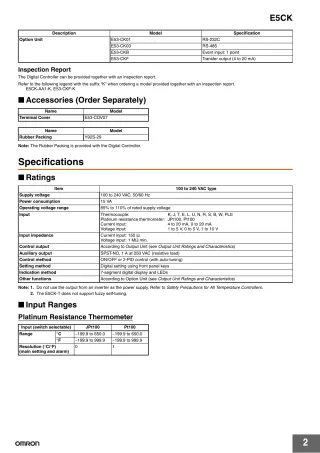
- 100 to 240 VAC, 50/60 Hz; 15 VA p. 2
- Inputs
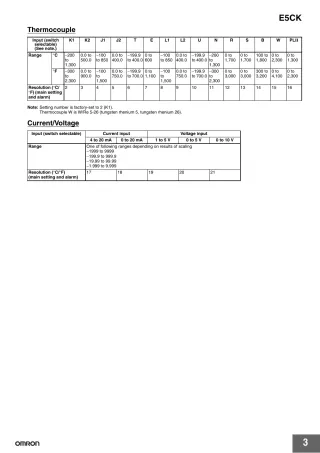
- Thermocouple K, J, T, E, L, U, N, R, S, B, W, PLII; RTD JPt100, Pt100; current 4 to 20 mA, 0 to 20 mA; voltage input p. 2
- Auxiliary output
- SPST-NO, 1 A at 250 VAC (resistive load) p. 2
- Control method
- ON/OFF or 2-PID control with auto-tuning p. 2
- Model numbers
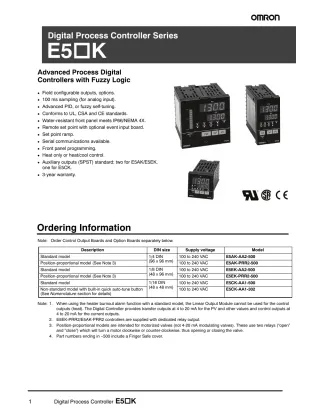
- E5CK-AA1, E5CK-AA1-500, E5CK-TAA1, E5CK-TAA1-500, all AC100-240; T means a program controller p. 1
- Output Units
- E53-R4R4 relay/relay, E53-Q4R4 pulse (NPN)/relay, E53-Q4HR4 pulse (PNP)/relay, E53-C4R4 4 to 20 mA/relay, E53-C4DR4 0 to 20 mA/relay, E53-Q4Q4 NPN/NPN, E53-Q4HQ4H PNP/PNP, E53-V44R4 p. 1
- Option Units
- E53-CK01 RS-232C, E53-CK03 RS-485, E53-CKB event input (1 point), E53-CKF transfer output (4 to 20 mA) p. 2
- Communications
- Half-duplex, start-stop; 1.2/2.4/4.8/9.6/19.2 kbps p. 5
- Accessories
- Terminal Cover E53-COV07; Rubber Packing Y92S-29 (provided); Unit Label Y92S-L1 p. 2, 7
- Ambient temperature
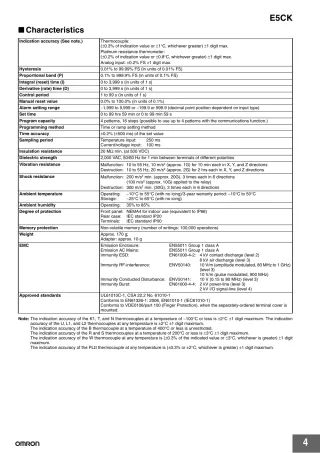
- -10°C to 55°C operating, -25°C to 65°C storage, no icing p. 4
- Weight
- Approx. 170 g; adapter approx. 10 g p. 4
- Panel mounting
- Cutout 45 +0.6/0 mm; panel thickness 1 to 5 mm p. 6
- Program capacity
- 4 patterns, 16 steps p. 4
What this sheet walks you through
- Decoding E5CK model numbers p. 1
- Choosing output and option units p. 1, 2
- Ordering a controller with an inspection report p. 2
- Reading the displays, keys and indicators p. 6
- Panel cutout and mounting space p. 6
Good to know
- Do not power the controller from an inverter output. p. 2
- The E5CK-T program models do not support fuzzy self-tuning. p. 2
- Only one Output Unit and one Option Unit fit each Base Unit. p. 1
- The sheet states VDE0106/part 100 finger protection only when the separately ordered terminal cover is mounted. p. 4
Questions this sheet answers
What does the T in E5CK-TAA1 mean?
T marks a program controller; a blank in that position means a constant value controller. p. 1
Which communications options does the E5CK have?
The E53-CK01 Option Unit adds RS-232C and the E53-CK03 adds RS-485. p. 2
What is the E5CK auxiliary output rating?
SPST-NO, 1 A at 250 VAC with a resistive load. p. 2
What panel cutout does the E5CK need?
45 +0.6/0 mm, in a panel 1 to 5 mm thick, with the specified spacing between units. p. 6
What power supply does the E5CK use?
100 to 240 VAC, 50/60 Hz, drawing 15 VA. Do not power it from an inverter output. p. 2
The whole text · 1 part
Read the sheet here as text
Its text as extracted from the PDF, unedited, in parts; each page opens the PDF at that page.
The file