Manual · Allen-Bradley
Broadband Communication Interface (Cat. No. 1771-KRF/B) User's Manual
Manual43 pagesPDF 267 KB
User's manual for the Allen-Bradley 1771-KRF/B broadband interface, which carries DH, DH+ and remote I/O over broadband cable.
Covers · 1 model
The models it covers
Summary
What is in it
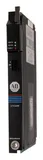
Allen-Bradley user's manual for the 1771-KRF/B Broadband Communication Interface, a single-slot 1771 module that lets Data Highway, Data Highway Plus and remote I/O stations communicate over a CATV-type broadband cable system. It explains how the module works on broadband, lists qualified Allen-Bradley devices, gives network guidelines and typical applications, then covers selecting channels, setting option switches, installing and connecting the module, LED troubleshooting, specifications and use with 6608 modems.
Its parts
- Preface
- Product Overview
- Guidelines for Connecting the KRF
- Selecting Channels and Setting Switches
- Installing and Connecting the KRF
From the manual
Key facts from this manual
Each line names its page in the PDF.
User's manual (publication 1771-6.5.59, September 1990) for the Allen-Bradley 1771-KRF/B Broadband Communication Interface, a 1771 I/O chassis module that carries Data Highway, Data Highway Plus and remote I/O links over a broadband cable system. It covers network guidelines, choosing a channel and setting the switches, wiring to DH/DH+ and remote I/O modules and to the broadband drop cable, and troubleshooting with the LEDs.
- Function
- Single-slot 1771 module that carries DH, DH+ and remote I/O links over a broadband (CATV type) cable system p. 6, 7, 8
- Communication rate
- 57.6K or 115.2K baud, set with SW-7 (up: 57.6K, down: 115.2K) p. 23, 40
- Ports
- DH/DH+ and remote I/O baseband: 3-screw terminal block; broadband: female type F connector p. 40
- Power
- 1.5 amps at 5VDC p. 40
- Channels
- CATV channel pairs T12/L, T13/M and T14/N; 18 subchannels of 750 KHz p. 20, 21
- Subchannels and translators
- T12 to L: 1-6, 6600-XLL; T13 to M: 9-14, 6600-XLM; T14 to N: 17-22, 6600-XLN p. 21
- Cabling
- Twinaxial baseband Belden 9463, 100 ft max, to the DH/DH+ or remote I/O module; 75 ohm RG-6 coax to broadband p. 29, 40
- Drop cables
- 6615-DC50 (50 ft.), 6615-DC25 (25 ft.), 6615-DC8 (6 ft.); RG-6 Drop Cable Kit 6615-DCK p. 35
- RF levels
- Transmit +45 dBmV nominal; receive range -13 dBmV to +15 dBmV p. 40
- Operating temperature
- 32 to 140 F (0 to 60 C) p. 40
- Termination
- Built-in 150 ohm at the KRF; a 150 ohm resistor at the DH/DH+ or remote I/O module unless terminated internally p. 29
- Nodes
- Up to 64 on the DH/DH+ broadband link p. 13
- Qualified radius
- Qualified on a broadband system of four miles from headend to the furthest KRF p. 9, 10
- Cable system
- Meets MAP/TOP or IEEE 802.7 broadband media specification p. 13
What this manual walks you through
- Planning DH, DH+ and remote I/O networks on broadband p. 13
- Setting the subchannel address with switches SW-1 to SW-5 p. 23, 24
- Setting the data rate with SW-7 and the reserved switches SW-6 and SW-8 p. 23
- Mounting the KRF in a 1771 I/O chassis p. 27
- Connecting the KRF to DH/DH+ modules, including the 1784-KT and 1784-KTK1 p. 29, 30, 31
- Connecting the KRF to remote I/O adapters and scanners p. 31, 32, 33, 34
- Connecting the drop cable to the broadband system p. 35, 36
- Troubleshooting with the XMTG, RCVG and FAULT LEDs p. 37, 38, 39
- Sharing a channel with 6608 frequency agile modems p. 41
Good to know
- Each DH/DH+ or remote I/O network on a common broadband system must use its own subchannel. p. 21
- Connect only one DH/DH+ or remote I/O device to the KRF twinaxial cable. p. 13
- Do not split one drop cable into several with extra taps and splitters. p. 36
- A Series 6600 single channel translator on the correct channel is required to operate the KRF. p. 5
- Without the reset signal from the chassis power supply the KRF will not power up correctly; check for an I/O adapter or 1771-EY jumper board in the far left slot. p. 38
Questions this manual answers
What does the Allen-Bradley 1771-KRF do?
It lets DH, DH+ and remote I/O stations communicate over a broadband cable system, one KRF per DH/DH+ or remote I/O module. p. 6, 8
How do I set the 1771-KRF baud rate?
With switch SW-7: up for 57.6K, down for 115.2K. p. 23
What does the FAULT LED on the 1771-KRF mean?
A fault at power up (possibly a missing or incorrect reset signal), a transmit lasting more than 500 milliseconds (bus hog), or the frequency synthesizer out of lock. p. 38
Which drop cable connects the 1771-KRF to the broadband tap?
Drop cables 6615-DC50, 6615-DC25 or 6615-DC8; other cables must be 75 ohm RG-6 with an F connector on each end and no longer than 100 ft. p. 35
How far can the 1771-KRF be from its DH/DH+ module?
The twinaxial cable between them should be as short as possible, 100 ft maximum. p. 29
Contents
Chapters and sections
Each line opens the PDF at its page.
The whole text · 6 parts
Read the manual here as text
Its text as extracted from the PDF, unedited, in parts; each page opens the PDF at that page.
The file