Manual · Allen-Bradley
Allen-Bradley Data Highway Plus Local Area Network Product Data
Manual28 pagesPDF 424 KB
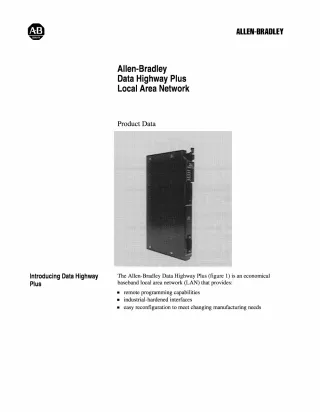
Product data for the Allen-Bradley Data Highway Plus network, its cabling and interfaces, including the 1785-KE module.
What this file really is
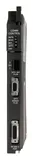
The old site listed this file as a manual for the Allen-Bradley 1785-KE. This is not a 1785-KE user manual but the product data for the Data Highway Plus network, in which the 1785-KE is one of the interfaces described.
Filed under · 1 model
Filed under these models in the old catalog
Summary
What is in it
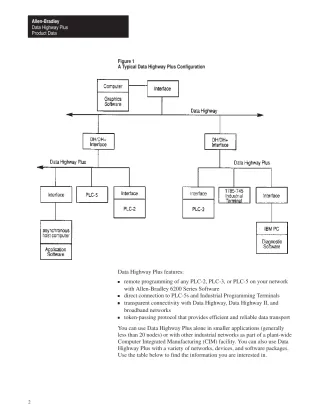
Product data for the Allen-Bradley Data Highway Plus local area network. It describes the trunkline and dropline cabling, the hardware interfaces that connect computers, terminals and PLC-2, PLC-3 and PLC-5 controllers (including the 1785-KE communication interface module), links to Data Highway, Data Highway II and broadband networks, network software, ordering information and specifications.
Its parts
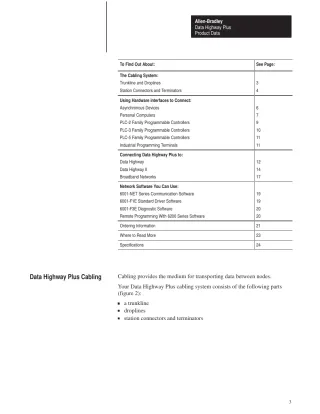
- Introducing Data Highway Plus
- Data Highway Plus Cabling
- Using Interfaces to Connect to Data Highway Plus
- Connecting Data Highway Plus to Other Networks
- Data Highway Plus Software
- Ordering Information
- Where to Read More
- Specifications
From the manual · read page by page
Key facts from this manual
Some pages are scans or cannot be read; this says only what the readable text supports. Each line names its page in the PDF.
Allen-Bradley Data Highway Plus Local Area Network Product Data (publication 1785-2.6, July 1990), an overview of the network rather than a 1785-KE user manual. Besides the 1785-KE it covers the 1770-KF2, 1784-KT, 1784-KL, 1785-KA3, 1775-S5, 1775-SR5, 1785-KA, 1779-KP5 and 1771-KRF interfaces, plus cabling, network software and ordering. Its specification pages list the ports, cables, power and temperature range of each interface.
- Function
- 1785-KE: interface module that connects an RS-232-C device, such as a computer, to a Data Highway Plus network p. 7, 27
- Mounting
- 1785-KE: installs in a 1771 I/O chassis p. 7, 27
- Communication rates
- 1785-KE: Data Highway Plus 57,600 bits per second; RS-232-C up to 19.2 Kb p. 7, 27
- Ports
- 1785-KE: Data Highway Plus 3-screw terminal block; 1784-T50 terminal 9-pin male D-shell; RS-232-C 15-pin female D-shell p. 27
- Power
- 1785-KE: 1.2 A @ 5 VDC p. 27
- Temperature and humidity
- 1785-KE: 0 to 60°C (32 to 140°F) operating, -40 to 85°C storage, humidity to 95% noncondensing p. 27
- Cables
- 1785-KE: RS-232-C via 1770-CG data terminal cable or 1770-CP modem cable; Data Highway Plus via Belden 9463 dropline p. 27
- SCADA use
- 1785-KE: can serve as a slave interface between Data Highway Plus and a SCADA master p. 7
- Host software
- 6001-NET Series software lets a VAX application communicate on Data Highway Plus through a 1785-KE or 1770-KF2 p. 19
- Network cable
- Twinaxial cable, Allen-Bradley 1770-CD or Belden 9463, for trunkline and droplines p. 21
- Cable lengths
- Trunkline up to 10,000 feet; each dropline up to 100 feet p. 4
- Station connector
- 1770-SC, one per node, with a 150-ohm terminating resistor p. 5, 21
- Dropline connector kit
- 1771-XE 15-pin female connector kit p. 4
- 1785-KE user manual
- Publication 1785-6.5.2 p. 23
What this manual walks you through
- Planning Data Highway Plus cabling: trunkline, droplines, station connectors and terminators p. 3, 4, 5
- Choosing the hardware interface for each type of device p. 5
- Connecting an RS-232-C computer or graphics station on the plant floor with the 1785-KE p. 7, 8
- Connecting personal computers and T45 terminals with the 1784-KT and 1784-KL p. 8
- Connecting PLC-2, PLC-3 and PLC-5 controllers p. 9, 10, 11
- Linking Data Highway Plus to Data Highway, Data Highway II and broadband networks p. 12, 14, 17
- Network, driver, diagnostic and programming software p. 19, 20
- Ordering cable, software and hardware interfaces p. 21, 22
Good to know
- Data Highway or Data Highway II nodes must not go directly on a Data Highway Plus trunkline. p. 4
- Only 1770-CD or Belden 9463 cable is to be used; other cable gives unreliable performance. p. 21
- A computer on an RS-232-C interface module reaches only the local Data Highway Plus, not Data Highway or a remote Data Highway Plus. p. 13
- Only Data Highway Plus nodes at addresses 002 through 020 (octal) can send commands to Data Highway II. p. 14
- Keep the cable away from heavy electrical noise or high voltage, and leave slack to avoid tension. p. 4
Questions this manual answers
What does the Allen-Bradley 1785-KE do?
It connects an RS-232-C device such as a computer to a Data Highway Plus network on the plant floor, mounted in a 1771 I/O chassis. p. 7
What RS-232 cable does the 1785-KE use?
A 1770-CG data terminal interface cable or a 1770-CP modem interface cable, or equivalents, on its 15-pin female D-shell port. p. 27
How much power does the 1785-KE need?
1.2 A at 5 VDC. p. 27
What cable is used for a Data Highway Plus network?
Twinaxial cable, Allen-Bradley 1770-CD or Belden 9463, for both the trunkline and droplines. p. 21
How long can a Data Highway Plus trunkline and dropline be?
The trunkline can be up to 10,000 feet and each dropline up to 100 feet. p. 4
Contents
Chapters and sections
Each line opens the PDF at its page.
- 1785-2.6, Allen-Bradley Data Highway Plus Local Area Network, Product Date1
- Introducing Data Highway Plus1
- Data Highway Plus Cabling3
- Using Interfaces to Connect to Data Highway Plus5
- The 1770-KF2 Asynchronous Interface Module7
- The 1785-KE Communication interface Module7
- The 1784-KT, -KL Hardware Interfaces8
- The 1784-KA3 PLC-2 Family Adapter Module9
- The 1775-S5, -SR5 PLC-3 Family I/O Scanner Module10
- Connecting a PLC-5 Family Programmable Controller11
- Connecting Allen-Bradley Industrial Programming Terminals11
- Connecting Data Highway Plus to Other Networks12
- Data Highway Plus Software19
- Ordering Information21
- Where to Read More23
- Specifications24
- Back Cover28
The whole text · 5 parts
Read the manual here as text
Its text as extracted from the PDF, unedited, in parts; each page opens the PDF at that page.
The file