Manual · Koyo
DL305 Handheld Programmer
Manual107 pagesPDF 2.6 MB
User manual for the DL305 Handheld Programmers, D3-HP (RLL) and D3-HPP (RLL PLUS), used to enter and monitor DL305 PLC programs.
Covers · 1 model
The models it covers
Summary
What is in it
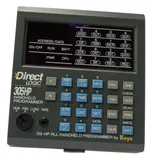
PLCDirect's manual for the DL305 Handheld Programmers, the D3-HP for RLL CPUs and the D3-HPP for RLL PLUS CPUs. It teaches the basic keystrokes: CPU setup and modes, entering RLL and RLL PLUS (stage) programs, finding, changing, inserting and deleting instructions, password protection, storing programs on cassette tape, and monitoring and forcing I/O points, registers, timers, counters and stages. An appendix lists the DL330, DL330P and DL340 memory maps.
Its parts
- Getting Started
- Entering RLL Programs
- Entering RLL PLUS Programs
- Changing Programs
- Protecting and Storing Programs
- System Monitoring and Troubleshooting
From the manual
Key facts from this manual
Each line names its page in the PDF.
User manual for the DL305 Handheld Programmer, covering both versions printed in it: the D3-HP for RLL CPUs and the D3-HPP for RLL PLUS CPUs. It gives the specifications and the keystrokes for entering, editing, storing and monitoring programs. It also lists the error codes the handheld can show.
- What it is
- Handheld programming tool for the DL305 family; D3-HP is the RLL version, D3-HPP the RLL PLUS version p. 8
- CPUs supported
- DL330, DL330P, DL340, and TI315, TI325, TI330, TI335; stage versions need the D3-HPP p. 13
- Power
- Taken from the PLC port: 60 mA @ 5 VDC and 60 mA @ 9 VDC p. 13
- Programmer cable
- D3-HPCBL-1, about 1.5 m (4.6 ft); the handheld can also mount directly on the CPU p. 12
- Display
- 4-character seven-segment address/data display, plus instruction LEDs and CPU status LEDs p. 14
- Operating temperature
- 32 to 140 F (0 to 60 C) p. 13
- Storage and humidity
- Storage -4 to 176 F (-20 to 80 C); humidity 5 to 95% non-condensing p. 13
- Weight
- 7.5 oz (210 g) p. 13
- Monitoring
- Status of up to 16 I/O points at once, plus timer, counter and register values p. 11, 13
- Keyswitch
- RUN, PRG and LOAD positions; the CPU mode is changed only with this keyswitch p. 20
- Cassette storage
- Built-in cassette tape interface with a supplied cable; about 75 seconds to copy a program to tape p. 10, 12, 73
- Error codes
- E01 invalid keystrokes, E03 stack overflow, E11 program full, E21 program memory parity error, E28 tape volume incorrect, E99 instruction not found p. 92, 93
- Companion manual
- DL305 User Manual (D3-USER-M) p. 9
What this manual walks you through
- Clearing CPU memory before entering a new program p. 21
- Changing the CPU between Run and Program modes p. 20
- Entering RLL and RLL PLUS programs and changing them p. 5
- Connecting a cassette recorder and writing a program to tape p. 72, 73
- Monitoring discrete I/O points p. 83
- Forcing discrete points p. 84
- Reading the handheld error codes p. 92, 93
Good to know
- Connecting the handheld changes the CPU mode if its keyswitch is set to a different mode. p. 12
- The DL305 CPUs keep a forced value for one scan only in the cases the manual describes. p. 84
- Programs on tape are stored one after another, so a badly positioned tape can overwrite one. p. 73
- Use the recorder's microphone jack when writing to tape and its earphone jack when reading. p. 72
- The handheld suits small programs and troubleshooting, not large complex programs. p. 8
Questions this manual answers
What cable connects the D3-HP to a DL305 CPU?
The D3-HPCBL-1 cable, about 1.5 m (4.6 ft) long. The handheld can also mount directly on the CPU. p. 12
Does the D3-HP program stage (RLL PLUS) CPUs?
No. The manual says stage versions require the D3-HPP, the RLL PLUS version. p. 8, 13
What does error E28 mean on a DL305 handheld?
The volume is wrong on the tape player used to load the program. Adjust the volume and try again. p. 93
How is the DL305 handheld programmer powered?
Through the PLC port, drawing 60 mA at 5 VDC and 60 mA at 9 VDC. p. 13
How many I/O points can the D3-HP monitor at once?
Up to 16 discrete points at a time, from inputs, outputs and control relays. p. 83
The whole text · 11 parts
Read the manual here as text
Its text as extracted from the PDF, unedited, in parts; each page opens the PDF at that page.
The file