Manual · Two Technologies
TechTerm Technical Reference Manual
Manual50 pagesPDF 590 KB
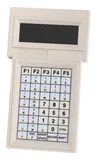
Technical reference manual for the Two Technologies TechTerm hand held ASCII terminal (TT1R2 RS-232 and other configurations).
Covers · 1 model
The models it covers
Summary
What is in it
Two Technologies technical reference for the TechTerm, a rugged hand held ASCII terminal for computers, instruments and industrial machinery. It explains the model number options (interface, power supply, keypad, display), power requirements and current draw, controls, cable and pin assignments, line and battery power, keypad and display operation, the parameter menu (baud rate, parity, handshake), function key programming, host escape and control commands, troubleshooting, specifications and keypad hex codes.
Its parts
- Chapter 1. Overview
- Chapter 2. Operation
- Chapter 3. Manual Configuration
- Chapter 4. Key Programming
- Chapter 5. Host Commands
- Chapter 6. Troubleshooting
From the manual
Key facts from this manual
Each line names its page in the PDF.
This is the TechTerm Technical Reference Manual (Document 15776) for Two Technologies TechTerm ASCII terminals in all their configurations, including the TT1R2 base unit with RS-232. It explains the model number options, power supply choice, cabling and pinout, setup parameters, host commands, specifications and troubleshooting. It is written for developers and applies to terminals made after May 2001.
- What it is
- Rugged ASCII terminal for computers, instruments and industrial machinery p. 5
- Interface
- TT1R2: RS-232; other models RS-422 or CMOS/LSTTL; 300 to 9,600 bps; 6 pin female modular connector p. 6, 42
- Display
- 4 rows x 20 characters, 5 x 7 pixel, reflective/transreflective LCD; supertwist, backlit and VFD options (no VFD on battery units) p. 41
- Keypad
- Membrane or elastomeric; 45-key (9 x 5) standard, also 30-key (6 x 5); optional backlit keypad p. 41
- Power
- 5 VDC +/- 5%, 7.5-12 VDC linear regulator, or 9.5-28 VDC switching regulator; maximum voltage depends on current draw p. 41
- Size and weight
- 8.25 x 4.10 x 1.15 inches (209.6 x 104.1 x 29.2 mm); 8 ounces (227 grams), 18 ounces (510 grams) with NiMH battery p. 42
- Operating temperature
- Nematic display: 0° to +50°C standard, -20°C to +70°C extended; VFD: -20° to +70°C, extended -40° to +70°C; humidity 5-95% non-condensing p. 42
- Battery units
- NiMH rechargeable pack, up to 40 hours, or six AA alkaline batteries; charger Part # 13799 p. 19
- Cables
- 1210-7 and 1210-15 modular cables (reversing); 1210-7-NR and 1210-15-NR (non-reversing); PCAT wired adapter p. 17
- Power supply
- 1226-1 linear power supply for units with a -2 power supply configuration, through the PCAT adapter p. 18
- Connector pinout
- RS-232/CMOS/TTL: pin 1 + supply, 2 handshake-in, 3 handshake-out, 4 data-in, 5 data-out, 6 common p. 16
- CPU
- Atmel AT89C55WD, 11.059 MHz p. 41
- Interface chips
- RS-232: Linear Technology LT1281; RS-422: Linear Technology LTC490 p. 16
- Battery power saver
- Turns battery units off after ten minutes of inactivity; low battery indicator means about one hour left p. 19
What this manual walks you through
- Reading the model number suffix for interface, power, keypad and display options p. 5
- Choosing the power supply configuration from the total current draw p. 6, 7
- Modular connector pin assignments and the 1210 cable and PCAT adapter wiring p. 16, 17
- Connecting the terminal to a host and powering a line-powered unit p. 18
- Charging the NiMH pack and changing batteries p. 19
- Troubleshooting a missing cursor, resets, wrong characters, PE characters and double characters p. 37, 38, 39
Good to know
- The six-pin modular jack is for serial devices only; connecting it to a telephone line damages the terminal. p. 16
- The manual applies only to TechTerm terminals made after May 2001, serial number HH184408 and above. p. 11
- The allowed input voltage falls as current draw rises; too high a voltage damages the terminal, so a -H supply may be needed. p. 7
- Charging above 90 degrees Fahrenheit may give incomplete charging and shorter operating time. p. 19
Questions this manual answers
What voltage does a TechTerm terminal need?
It depends on the power supply configuration: -1 needs 5 volts ± 5% regulated, -2 needs 7.5 to 12 VDC, and -H takes 9.5 to 28 VDC. p. 6
How long does the TechTerm battery last?
Battery units run up to 40 hours on a full charge of the NiMH pack, and a full charge with the terminal off should take no more than eight hours. p. 19
What cable connects a TechTerm to a host computer?
A 1210 series modular cable from the terminal's modular connector to the PCAT adapter, which plugs into the host device. p. 18
Why does my TechTerm reset or lock up?
The manual lists low voltage, cable resistance too high (cable should be 26 AWG or larger) and handshaking problems between host and terminal. p. 37
Why does the TechTerm show double characters?
Echo is turned on; disable the ECHO parameter. p. 38
The whole text · 5 parts
Read the manual here as text
Its text as extracted from the PDF, unedited, in parts; each page opens the PDF at that page.
The file