Manual · Fanuc
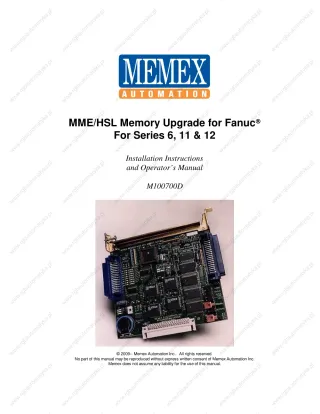
MME/HSL Memory Upgrade for Fanuc For Series 6, 11 & 12: Installation Instructions and Operator's Manual
Manual38 pagesPDF 2.9 MB
Installation and operator's manual for the Memex MME/HSL memory upgrade boards for Fanuc Series 6, 11 and 12 CNC controls.
What this file really is
The old site listed this file as a manual for the Fanuc A87L-0001-0017 and Hitachi A87L-0001-0017. A reseller's datasheet cover for the A87L-0001-0017 wrapped around Memex's manual for its MME/HSL memory upgrade boards for Fanuc controls; the manual itself does not name the A87L-0001-0017.
Filed with · 2 models
Also filed with these models on the old site
Summary
What is in it
Memex Automation's installation instructions and operator's manual for its MME (Memex Memory Engine), a static RAM board that replaces the Bubble Memory Unit (BMU) in Fanuc machine tool controls. It describes the board's features, the Parameter Sentry backup system and Quick-Load parameter transfer, then gives backup, installation and restore procedures for the Fanuc 6 and Fanuc 11/12 with checklists. The appendix has technical summaries, a parameter worksheet, specifications and an ASCII table. The file opens with a reseller's datasheet cover for the A87L-0001-0017.
Its parts
- Introduction
- The Basics
- Installation for Fanuc 6
- Installation for Fanuc 11/12
- Appendix
From the manual
Key facts from this manual
Each line names its page in the PDF.
Memex installation instructions and operator's manual (M100700D) for the MME/HSL memory upgrade, a static RAM board that replaces the bubble memory unit (BMU) in Fanuc Series 6, 11 and 12 controls. It walks through backing up the control, the Quick-Load transfer from the old BMU, the Parameter Sentry backup and technical summaries. A87L-0001-0017 appears on an added cover sheet and in the appendix list of Fanuc bubble memory boards; the manual itself describes the Memex replacement board, not that part.
- Device
- Memex MME static RAM memory board replacing the bubble memory unit (BMU) in Fanuc Series 6, 9, 11 and 12 controls p. 6
- Quick-Load
- The old BMU plugs onto the MME's BMU connector and its parameters transfer when the control is powered on p. 6, 7
- Parameter Sentry
- Saves the first 20 meters (8K): NC and PC parameters, tool offsets, pitch error compensation, system data; not part programs. HSL saves the bottom 1280 meters (512k) p. 8
- Memory
- SRAM in 128k, 512k or 2 meg sizes; 2 megs on a Fanuc 11/12 uses the HSL; 8K x 8 NVSRAM for Parameter Sentry p. 6, 7
- Processor
- MME: 20 MHz on-board RISC processor, socketed p. 6, 7
- Battery
- Rechargeable lithium PermaCharge battery, recharged while powered; over 3,000 discharge cycles or 10 years minimum p. 6, 35
- Power
- 5 VDC +/- 5%; 3.75 W (250 mA) maximum, excluding BMU p. 35
- Board size
- 5.3" x 5.9" p. 6, 35
- Diagnostic port
- On-board 19200 baud serial port p. 6
- Indicators and controls
- Status LEDs for Turbo, Data Status, Quick Load, Save and Restore; toggle switch and push button for Parameter Sentry; jumpers select CNC type p. 7
- Controls covered
- Quick-Load procedures for Fanuc 6A, 6B and 6-B2, and Fanuc 11A, 11B and 12 p. 13, 22
- Install time and tools
- About 1 hour with one Philips screwdriver p. 13, 22
- Fanuc serial port
- DB-25 female: pin 2 transmit data, pin 3 receive data, pin 7 signal ground p. 29
- Bubble boards listed
- A87L-0001-0015, -0016, -0017, -0105, -0018, -0084, -0085 and -0086 p. 29
What this manual walks you through
- Saving and restoring parameters with Parameter Sentry p. 8
- Handling and installation precautions p. 9
- Verifying the control after the upgrade p. 9
- Backing up a Fanuc 6 control to a computer p. 10, 11, 12
- Quick-Load installation on a Fanuc 6 p. 13, 14
- Backing up a Fanuc 11/12 control p. 20, 21
- Quick-Load installation on a Fanuc 11/12 p. 22, 23
- Alternative method rewriting the System Label after an install error p. 23, 24
- Fanuc serial port pinout and handshaking cable p. 29
Good to know
- Never install or remove the board with the control power on. p. 9
- The boards are static sensitive; do not set them on metal, as a shorted backup battery could be damaged. p. 9
- Fit the MME only in the master-board slot labeled BMU. p. 9
- The MME ships with no useful data; parameters, offsets and programs must be reloaded, and part programs are not Quick-loaded. p. 9, 14
- After a Quick-Load on Fanuc 11/12, keep rapid and feed rate overrides low while testing. p. 23
Questions this manual answers
What does the Memex MME memory board replace?
The bubble memory unit (BMU) in Fanuc Series 6, 9, 11 and 12 machine tool controls. p. 6
How do I save parameters with Parameter Sentry?
With the control on, hold the toggle switch toward SAVE, briefly push the PARAM SENTRY button, then release the switch; the LED lights for about one second. p. 8
Does Quick-Load copy part programs?
No. On the Fanuc 6 procedure the manual notes part programs are not Quick-loaded, so back them up first. p. 14
How long does the MME installation take?
About 1 hour, with one Philips screwdriver. p. 13
Is the A87L-0001-0017 bubble memory board listed in the Memex manual?
Yes. It appears in the appendix list of Fanuc bubble memory board sizes, with A87L-0001-0015, -0016, -0105, -0018, -0084, -0085 and -0086. p. 29
The whole text · 4 parts
Read the manual here as text
Its text as extracted from the PDF, unedited, in parts; each page opens the PDF at that page.
The file