Manual · Allen-Bradley
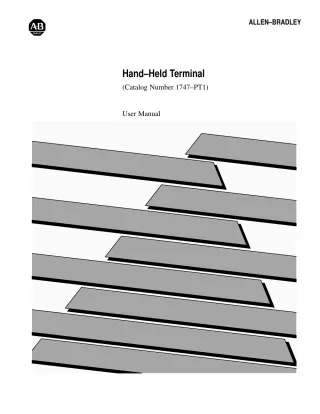
Hand-Held Terminal (Catalog Number 1747-PT1) User Manual
Manual486 pagesPDF 1.5 MB
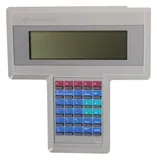
User manual for the Allen-Bradley 1747-PT1 Hand-Held Terminal used to program SLC 500 fixed, SLC 5/01 and SLC 5/02 controllers.
Covers · 1 model
The models it covers
Summary
What is in it
The full user manual for the Allen-Bradley 1747-PT1 Hand-Held Terminal (HHT). It covers installing the memory pak, battery and communication cable, the keyboard and menu tree, data file addressing, writing and editing ladder programs, saving and compiling, online communication on DH-485, downloading and uploading, processor modes, monitoring and forcing I/O, EEPROM and UVPROM memory modules, and the SLC instruction set.
Its parts
- Features, Installation, Powerup
- The Menu Tree
- Understanding File Organization
- Data File Organization and Addressing
- Ladder Program Basics
- Creating a Program
- Creating and Editing Program Files
- Saving and Compiling a Program
- Configuring Online Communication
- Downloading/Uploading a Program
- Processor Modes
- Monitoring Controller Operation
- The Force Function
- Using EEPROMs and UVPROMs
- Instruction Set Overview
From the manual
Key facts from this manual
Each line names its page in the PDF.
User manual for the Allen-Bradley 1747-PT1 Hand-Held Terminal (HHT), used to configure, program, monitor and troubleshoot SLC 500 fixed, SLC 5/01 and SLC 5/02 controllers. It covers installing the memory pak, battery and cable, the keyboard and menus, ladder programming and the instruction set, and the messages the terminal shows.
- What it is
- Hand-held programming terminal for SLC 500 fixed, SLC 5/01 and SLC 5/02 controllers: configure, edit, download/upload and monitor programs p. 25
- Not compatible
- SLC 5/03 processors p. 443
- Communications
- DH-485; point-to-point or on a network of up to 31 nodes over a maximum of 4,000 feet (1219 meters) p. 25
- Operating power
- 0.105 Amps (max.) at 24 VDC p. 25
- Display
- 8 lines by 40 characters, showing up to five rungs of a program p. 26
- Keyboard
- 30 keys, calculator-style and color-coded p. 25, 26
- Battery
- 1747-BA; keeps the user program in the HHT, memory retention 2 years p. 25
- Memory pak
- 1747-PTA1E (English version), installed first in the back of the HHT p. 27
- Cable
- 1747-C10 communication cable to the SLC 500 communication port or the 1747-AIC peripheral port p. 30
- Power supplies
- 1747-NP1 wall mount or 1747-NP2 desktop power supply for standalone use p. 25, 30
- Software shown
- Powerup screen in the manual reads SLC 500 PROGRAMMING SOFTWARE Rel. 2.03, 1747-PTA1E p. 31
- Self-tests
- Display, keypad, RAM, ROM and watchdog tests from the SELFTEST menu p. 31
- Getting started guide
- Getting Started Guide for HHT, 1747-NM009 p. 19
What this manual walks you through
- Installing the memory pak p. 27, 28
- Installing the battery p. 29
- Connecting the HHT to an SLC 500 controller or 1747-AIC link coupler p. 30
- Powering up and running the self-tests p. 31
- Reading the display and using the keyboard p. 32, 33, 34, 35, 36
- Downloading and uploading programs p. 20
- Forcing I/O p. 20
- Transferring a program to or from an EEPROM p. 20
- Understanding HHT messages and error definitions p. 441, 442, 443, 444
Good to know
- Without a battery, with the battery low defeat jumper in place, the program is cleared when the HHT is powered off. p. 29
- A flashing B on the prompt line means the battery is missing, badly installed or low. p. 29
- The memory pak contains CMOS devices; use a grounding strap when handling it. p. 27
- A program saved with errors cannot be downloaded to the processor. p. 441
- Data files 0, 1 and 2 and program files 0 and 1 cannot be deleted. p. 442
Questions this manual answers
Which SLC processors does the 1747-PT1 work with?
SLC 500 fixed, SLC 5/01 and SLC 5/02 controllers; it is not compatible with the SLC 5/03. p. 25, 443
What battery does the 1747-PT1 hand-held terminal use?
The 1747-BA battery, which lets the HHT keep a user program in memory. p. 25, 29
What does BATTERY TEST FAILED mean on the 1747-PT1?
The HHT battery is missing or has lost power, and a stored program may be lost; connect or replace the battery or fit the battery jumper. p. 441
Which cable connects the 1747-PT1 to an SLC 500?
The 1747-C10 communication cable, from the top of the HHT to the controller's communication port or a 1747-AIC peripheral port. p. 30
What does NO RESPONSE FROM PROCESSOR mean?
The processor is not answering the HHT; check power and communication connections, the baud rate and the number of devices on the network. p. 444
Contents
Chapters and sections
Each line opens the PDF at its page.
- 1747-NP002, Hand-Held Terminal User Manual1
- Important User Information2
- Summary of Changes3
- Preface19
- 1 - Features, Installation, Powerup25
- 2 - The Menu Tree37
- 3 - Understanding File Organization53
- 4 - Data File Organization and Addressing57
- 5 - Ladder Program Basics85
181 more lines, from page 88 on
- Parallel Logic88
- 6 - Creating a Program99
- 7 - Creating and Editing Program Files113
- 8 - Saving and Compiling a Program159
- 9 - Configuring Online Communication165
- 10 - Downloading/Uploading a Program177
- 11 - Processor Modes183
- 12 - Monitoring Controller Operation187
- 13 - The Force Function199
- 14 - Using EEPROMs and UVPROMs209
- 15 - Instruction Set Overview215
- 16 - Bit Instructions225
- 17 - Timer and Counter Instructions233
- 18 - I/O Message and Communication Instructions247
- 19 - Comparison Instructions267
- 20 - Math Instructions277
- Math Instructions Overview277
- Add (ADD)279
- Subtract (SUB)280
- 32-Bit Addition and Subtraction-Series C and Later SLC 5/02 Processors281
- Multiply (MUL)283
- Divide (DIV)284
- Double Divide (DDV)285
- Negate (NEG)286
- Clear (CLR)287
- Convert to BCD (TOD)288
- Convert from BCD (FRD)291
- Decode 4 to 1 of 16 (DCD)295
- Square Root (SQR)296
- Scale Data (SCL)297
- 21 - Move and Logical Instructions301
- 22 - File Copy and File Fill Instructions309
- 23 - Bit Shift, FIFO, and LIFO Instructions313
- 24 - Sequencer Instructions323
- 25 - Control Instructions333
- 26 - PID Instruction345
- 27 - The Status File369
- 28 - Troubleshooting Faults403
- 29 - Understanding the User Fault Routine – SLC 5/02 Processor Only413
- 30 - Understanding Selectable Timed Interrupts – SLC 5/02 Processor Only421
- 31 - Understanding I/O Interrupts – SLC 5/02 Processor Only431
- A - HHT Messages and Error Definitions441
- B - Number Systems, Hex Mask449
- C - Memory Usage, Instruction Execution Times455
- D - Estimating Scan Time467
- Index475
- Back Cover486
The whole text · 55 parts
Read the manual here as text
Its text as extracted from the PDF, unedited, in parts; each page opens the PDF at that page.
- Pages 1 to 41-4
- Table of Contents, pages 5 to 115-11
- Table of Contents, pages 12 to 1812-18
- Preface19-24
- 1 - Features, Installation, Powerup25-36
- 2 - The Menu Tree, pages 37 to 4437-44
- 2 - The Menu Tree, pages 45 to 5245-52
- 3 - Understanding File Organization53-56
- 4 - Data File Organization and Addressing, pages 57 to 6657-66
- 4 - Data File Organization and Addressing, pages 67 to 7667-76
- 4 - Data File Organization and Addressing, pages 77 to 8477-84
- 5 - Ladder Program Basics85-98
- 6 - Creating a Program99-112
- 7 - Creating and Editing Program Files, pages 113 to 122113-122
- 7 - Creating and Editing Program Files, pages 123 to 132123-132
- 7 - Creating and Editing Program Files, pages 133 to 142133-142
- 7 - Creating and Editing Program Files, pages 143 to 152143-152
- 7 - Creating and Editing Program Files, pages 153 to 158153-158
- 8 - Saving and Compiling a Program159-164
- 9 - Configuring Online Communication165-176
- 10 - Downloading/Uploading a Program177-182
- 11 - Processor Modes183-186
- 12 - Monitoring Controller Operation187-198
- 13 - The Force Function199-208
- 14 - Using EEPROMs and UVPROMs209-214
- 15 - Instruction Set Overview215-224
- 16 - Bit Instructions225-232
- 17 - Timer and Counter Instructions233-246
- 18 - I/O Message and Communication Instructions, pages 247 to 256247-256
- 18 - I/O Message and Communication Instructions, pages 257 to 266257-266
- 19 - Comparison Instructions267-276
- 20 - Math Instructions, pages 277 to 284277-284
- 20 - Math Instructions, pages 285 to 292285-292
- 20 - Math Instructions, pages 293 to 300293-300
- 21 - Move and Logical Instructions301-308
- 22 - File Copy and File Fill Instructions309-312
- 23 - Bit Shift, FIFO, and LIFO Instructions313-322
- 24 - Sequencer Instructions323-332
- 25 - Control Instructions333-344
- 26 - PID Instruction, pages 345 to 352345-352
- 26 - PID Instruction, pages 353 to 360353-360
- 26 - PID Instruction, pages 361 to 368361-368
- 27 - The Status File, pages 369 to 377369-377
- 27 - The Status File, pages 378 to 386378-386
- 27 - The Status File, pages 387 to 395387-395
- 27 - The Status File, pages 396 to 402396-402
- 28 - Troubleshooting Faults403-412
- 29 - Understanding the User Fault Routine – SLC 5/02 Processor Only413-420
- 30 - Understanding Selectable Timed Interrupts – SLC 5/02 Processor Only421-430
- 31 - Understanding I/O Interrupts – SLC 5/02 Processor Only431-440
- A - HHT Messages and Error Definitions441-448
- B - Number Systems, Hex Mask449-454
- C - Memory Usage, Instruction Execution Times455-466
- D - Estimating Scan Time467-474
- Pages 475 to 486475-486
The file