Manual · AutomationDirect
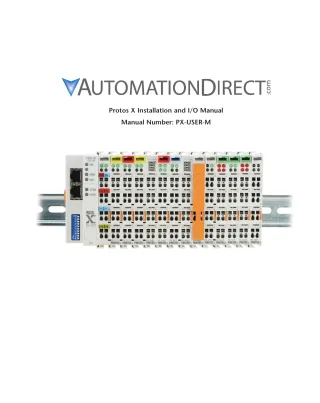
Protos X Installation and I/O Manual
Manual138 pagesPDF 45 MB
Installation and I/O manual for the AutomationDirect Protos X field I/O system, its bus couplers and terminals such as the PX-901.
Covers · 1 model
The models it covers
Summary
What is in it
AutomationDirect's installation and I/O manual for the Protos X modular field I/O system, which lets remote I/O be installed without another PLC. It gives specifications for the PX-MOD, PX-TCP1, PX-TCP2 and PX-EIP1 bus couplers and the bus end, expansion, power, discrete and analog terminals (including the PX-901 Bus End Terminal), then covers Modbus and EtherNet/IP communication, safety, installation and wiring, the PG-CFGSW configuration software, I/O mapping and troubleshooting with diagnostic LEDs.
Its parts
- Getting Started
- Specifications
- Installation and Wiring
- Protos X Configuration
- Troubleshooting
From the manual
Key facts from this manual
Each line names its page in the PDF.
Installation and I/O manual (PX-USER-M) for the AutomationDirect Protos X field I/O system as a whole, not only the PX-901 bus end terminal. It covers the PX-MOD, PX-TCP1, PX-TCP2 and PX-EIP1 bus couplers, the PX-901, PX-902 and PX-903 bus end and expansion terminals, the power and I/O terminals, installation and wiring, configuration, and troubleshooting by the diagnostic LEDs.
- What it is
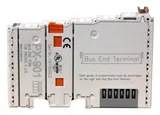
- Protos X bus end terminal, fitted at the end of a terminal assembly; required for I/O bus communication p. 15, 38
- Terminal type
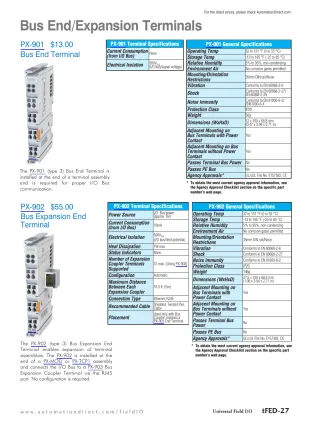
- Type 3: does not pass the terminal power bus or PE, interrupts both, may follow any terminal p. 36, 38
- Dimensions
- 12 x 100 x 68.8 mm (0.47 x 3.94 x 2.71 in), W x H x D p. 38
- Diagnostics
- Coupler error "break behind bus terminal (n)": check that the PX-901 is connected p. 105
- Expansion
- Beyond 64 terminals, a PX-902 replaces the PX-901 and a PX-903 is used at each expansion assembly; up to 31 expansion couplers p. 17
- Assembly size
- 64 terminals per bus coupler assembly; up to 255 with expansion on the PX-MOD and PX-TCP1 p. 83
- Bus couplers
- PX-MOD: Modbus RTU/ASCII over RS485; PX-TCP1 and PX-TCP2: Modbus TCP; PX-EIP1: EtherNet/IP p. 15
- I/O terminals
- 12 discrete terminals (2, 4, 8 or 16 points) and 18 analog terminals (2, 4 or 8 channels) p. 15
- I/O mapping
- 512 bytes of input and 512 bytes of output mapping per bus coupler p. 83
- Coupler power
- 24VAC or 24VDC from an external supply, connected to the bus coupler p. 17
- Configuration
- PX-USB-232 cable, 3m (9.8 ft), USB type A to 4-pin micro connector; PX-CFGSW software p. 16
- Bus contacts
- I/O bus data through six contacts on the terminal side walls; power through two power contacts p. 17
What this manual walks you through
- Choosing the system components: couplers, I/O, power and bus end terminals p. 15, 16
- A typical system setup and how expansion works p. 17
- The five terminal types and how they pass terminal power and PE p. 36, 37
- Specifications of the bus end and expansion terminals p. 38, 39, 40, 41
- Calculating the I/O bus power budget p. 83, 84
- Reading the bus coupler diagnostic LEDs and blink codes p. 102, 103, 104, 105, 106, 107
- What the PX-CFGSW configuration software can set p. 16
Good to know
- The PX-TCP2 bus coupler does not support expansion. p. 17
- The coupler I/O bus power budget must not be exceeded: there is no internal protection and the coupler will be damaged. p. 83
- Terminals that pass terminal power cannot sit to the right of a terminal that does not. p. 36
- Expansion links use Cat5e STP cable, at most 16.5 ft (5m) per segment. p. 41
Questions this manual answers
What does the Protos X PX-901 do?
It is the bus end terminal at the end of a terminal assembly, and it is required for proper I/O bus communication. p. 15, 38
The bus coupler reports a break behind a bus terminal. What do I check?
Check whether the PX-901 bus end terminal is connected. p. 105
How do I connect more than 64 Protos X terminals?
Use a PX-902 in place of the PX-901 and a PX-903 at each expansion assembly in place of a PX-MOD or PX-TCP1, linked by RJ45 patch cables; up to 31 expansion couplers. p. 17
Does the PX-901 pass terminal power to other terminals?
No. It is a type 3 terminal, which interrupts the terminal power bus and PE. p. 36, 38
How much I/O data can one Protos X bus coupler map?
512 bytes of input and 512 bytes of output mapping. p. 83
Contents
Chapters and sections
Each line opens the PDF at its page.
The whole text · 14 parts
Read the manual here as text
Its text as extracted from the PDF, unedited, in parts; each page opens the PDF at that page.
The file