Manual · Allen-Bradley
Guard I/O EtherNet/IP Safety Modules User Manual
Manual140 pagesPDF 7.3 MB
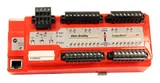
User manual for Allen-Bradley Guard I/O EtherNet/IP safety modules: 1791ES-IB8XOBV4, 1791ES-IB16 and 1732ES models.
Covers · 1 model
The models it covers
Summary
What is in it
Rockwell Automation user manual for the Guard I/O EtherNet/IP safety modules, catalog numbers 1791ES-IB8XOBV4, 1791ES-IB16, 1732ES-IB12XOB4 and 1732ES-IB12XOBV2. It explains how the safety inputs, test outputs and safety outputs work, how to mount, wire and set the IP address of the modules, gives wiring examples by safety category, shows configuration in the Logix Designer application, and covers status indicators, explicit messaging, safety data and specifications.
Its parts
- Preface
- About the Modules
- Understand the Operation of Safety Functions
- Install the Module
- Wiring Examples
- Configure the I/O Modules by Using the Logix Designer Application
- Interpret the Module Status Indicators
From the manual
Key facts from this manual
Each line names its page in the PDF.
This is the user manual for the Guard I/O EtherNet/IP Safety Modules, catalog numbers 1791ES-IB8XOBV4, 1791ES-IB16, 1732ES-IB12XOB4 and 1732ES-IB12XOBV2. It explains what the modules do in a CIP Safety system on EtherNet/IP, how to choose a power supply, and how to read the status indicators. It also lists the electrical, environmental and certification specifications of the 1791ES and 1732ES modules.
- Device
- Guard I/O safety I/O module using the CIP Safety protocol over EtherNet/IP p. 13
- 1791ES models
- 1791ES-IB16: CompactBlock safety input module; 1791ES-IB8XOBV4: CompactBlock safety I/O module with solid-state outputs p. 15
- Operating voltage
- 19.2…28.8V DC (24V DC, -20…20%) p. 124
- Safety inputs
- 1791ES: current sinking, IEC 61131-2 Type 3; on-state 11V DC min, off-state 5V DC max p. 123
- Safety outputs
- 1791ES-IB8XOBV4: 4 dual-channel, current sourcing/current sinking bipolar pairs, 2 A max per point p. 124
- Test outputs
- 1791ES: current sourcing, 0.7 A per output p. 123
- Current draw
- 1791ES: 250 mA at 24V DC communication current p. 124
- Enclosure rating
- 1791ES: IP20; 1732ES: IP65/IP67 (when marked) p. 124, 126
- Weight and size
- 1791ES: 600 g (1.32 lb); 80 x 196 x 77 mm (3.2 x 7.7 x 3 in.) with terminal block p. 125
- Wire size
- 1791ES: 0.34…1.5 mm2 (22…16 AWG) solid or stranded copper for power and I/O p. 125
- Operating temperature
- 1791ES: -20…60 °C (-4…140 °F); 1732ES: -20…55 °C (-4…131 °F) p. 127, 128
- Reaction time
- Input 16.2 ms max plus ON/OFF delays; output 6.2 ms max plus relay response time p. 128
- Connectors
- 1791ES: removable I/O connectors with mechanical keying p. 14
- Safety level
- The manual states use up to SIL CL 3 (IEC 61508) and Category 4, PLe (ISO 13849-1) p. 13
What this manual walks you through
- Understanding what the Guard I/O modules do in a safety network p. 13, 14
- Choosing a power supply for the modules p. 15
- Identifying the major parts of the 1791ES and 1732ES modules p. 17
- Reading the 1791ES module status indicators p. 85, 86, 87
- Reading the 1732ES module status indicators p. 87, 88
- Technical and environmental specifications p. 123, 124, 125, 126, 127, 128, 129
- Certifications and related standards p. 130, 131
Good to know
- Do not disassemble, repair or modify the module; a damaged or malfunctioning module goes back to the manufacturer for repair. p. 13
- Do not use EtherNet/IP standard I/O data or explicit message data as safety data. p. 13
- Clear any previous configuration before connecting an installed or replacement module to the network or to power. p. 13
- Verify the firmware revision before commissioning the safety system. p. 12
- Only the 1732ES modules work with DLR (ring) topology. p. 16
Questions this manual answers
What is the difference between the 1791ES-IB16 and 1791ES-IB8XOBV4?
The 1791ES-IB16 is a CompactBlock safety input module; the 1791ES-IB8XOBV4 is a CompactBlock safety I/O module with solid-state outputs. p. 15
What does a solid red module status light mean on a 1791ES module?
The module detected an unrecoverable fault. Cycle power, and replace the module if the problem persists. p. 86
What does a solid red network status light mean on a 1791ES module?
A critical link failure, such as a duplicate IP address. Cycle power and check the network IP addressing. p. 86
What power supply does a 1791ES Guard I/O module need?
A 24V DC supply (19.2 to 28.8V DC) that is SELV rated, with double or reinforced insulation. p. 15, 124
How much does a 1791ES module weigh?
About 600 g (1.32 lb). p. 125
Contents
Chapters and sections
Each line opens the PDF at its page.
- Guard I/O EtherNet/IP Safety Modules User Manual1
- Important User Information2
- Summary of Changes3
- Preface9
- 1 - About the Modules11
- 2 - Understand the Operation of Safety Functions19
- 3 - Install the Module35
- 4 - Wiring Examples57
- 5 - Configure the I/O Modules by Using the Logix Designer Application69
- 6 - Interpret the Module Status Indicators85
- A - Get Diagnostic Status from Modules by Using Explicit Messaging91
- B - Safety Data117
- C - Configuration Reference Information121
- D - Specifications123
- E - History of Changes133
- Index135
- Back Cover140
The whole text · 14 parts
Read the manual here as text
Its text as extracted from the PDF, unedited, in parts; each page opens the PDF at that page.
The file