Manual · Hirata
580 Series Controller Teach Pendant Operation Manual
Manual217 pagesPDF 3.4 MB
Operation manual for the Hirata H-3335 teach pendant used with the HNC-580 series robot controller for SCARA and Cartesian robots.
Covers · 1 model
The models it covers
Summary
What is in it
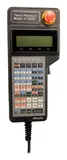
Hirata's operation manual for the teach pendant (type H-3335) of the 580 series robot controller, which controls SCARA (AR series) and Cartesian manipulators. It explains connecting and configuring the pendant, automatic calibration (A-CAL), the KEY-IN, TEACH, CHECK and ON-LINE modes, editing position data, I/O monitoring, the HOLD function, automatic creation of position data and parameters, memory card operations and robot motion types, with the pendant's specifications.
Its parts
- About This Manual and Notice
- Connecting the Teach Pendant
- A-CAL (Automatic Calibration)
- KEY-IN Mode
- TEACH Mode
- CHECK Mode
- ON-LINE Mode
- Data Editing
- INPUT/OUTPUT Operations
- HOLD Function
- Positioning Address History
- Automatic Creation of Position Data & Parameters
- Memory Card
- W-Axis Sensor Stop
- Operation Method for Vision in AUTO Mode
From the manual
Key facts from this manual
Each line names its page in the PDF.
This is the Hirata operation manual HD-3810E-1 for the 580 Series Controller Teach Pendant, type H-3335, used with the HNC-580 series robot controller. It explains how to connect the pendant, use its keys, modes and LEDs, run automatic calibration and work with memory cards. It also lists the messages and errors the pendant shows, with corrective actions.
- What it is
- Teach pendant for the Hirata HNC-580 series robot controller p. 5, 10
- Display
- LCD (20×4) and LEDs p. 10
- Dimensions
- 107mm (W) x 238mm (D) x 40mm (H) p. 10
- Weight
- 1kg including 4m cable p. 10
- Cable length
- 4m (15m as option) p. 10
- Temperature
- Operating 0 to 40 ℃; storage -20 to 60℃ p. 10
- Modes
- KEY-IN, TEACH, CHECK, ON-LINE p. 10
- Stop controls
- Emergency Stop button (lock type) and Deadman switch p. 10
- Robots controlled
- SCARA (Hirata AR series) and Cartesian manipulators p. 5
- LEDs
- SHIFT, HOLD, READY, A-CAL, OVER, E-STOP p. 10
- Controller interfaces
- One of: DI/DO, CC-Link or Compo/Bus interface board p. 5
- Memory card
- Optional; RAM 64KB/128KB/256KB, 68 pins, JEIDA Ver.4, replaceable BR2325 lithium battery p. 103, 119
- Controller batteries
- CPU board battery H-3339; encoder battery R086-12-38 p. 198
- Encoder
- ABS (absolute) encoder, so A-CAL is needed only once, at installation p. 27
What this manual walks you through
- Outline of setting up a robot system p. 6, 7
- What each key, switch and LED does p. 9, 10
- Connecting the pendant to the controller p. 11, 12
- Logging in and selecting a robot p. 12
- Running A-CAL automatic calibration p. 27, 28
- Saving and loading data on a memory card p. 103, 104
- Reading messages and fixing errors p. 195, 196, 197, 198, 199, 200
Good to know
- Keep the Remove switch pressed while connecting or disconnecting the pendant; releasing it shuts off power. p. 11
- A dummy connector must be fitted when the system runs without the pendant. p. 11
- Releasing the Deadman switch puts the robot into Emergency Stop. p. 9
- Do not use the system above 40℃ or in high humidity. p. 7
- A new memory card must be formatted before use. p. 103
Questions this manual answers
What is the Hirata H-3335?
It is the teach pendant for the Hirata HNC-580 series robot controller, with a 20×4 LCD and four modes. p. 5, 10
How long is the Hirata teach pendant cable?
4m as standard, with 15m as an option. p. 10
What battery does the 580 controller CPU board take?
Battery type H-3339, replaced when the CPU LOW BATTERY error appears. p. 198
What does CARD NOT READY mean on the Hirata pendant?
No memory card is in place; insert a memory card properly. p. 197
How long does a memory card keep its data?
2.5 years for 128 KB cards and 4 years for 64 KB cards. p. 119
Contents
Chapters and sections
Each line opens the PDF at its page.
- Notations4
- About This Manual and Notice5
- Connecting the Teach Pendant8
- A-CAL(Automatic Calibration)27
- KEY-IN Mode35
- TEACH Mode40
- CHECK Mode46
- ON-LINE Mode49
- Data Editing69
- INPUT/OUTPUT Operations77
- HOLD Function79
- Positioning Address History80
- Automatic Creation of Position Data & Parameters82
- Memory Card103
- W-Axis Sensor Stop120
- Operation Method for Vision in AUTO Mode121
- Robot Operation122
- System Data136
- Details of System Generation142
- Details of System Parameters159
- System Configuration181
- Initializing System Data191
- Initializing Position Data194
- Message195
- System Generation201
- System Parameters206
The whole text · 22 parts
Read the manual here as text
Its text as extracted from the PDF, unedited, in parts; each page opens the PDF at that page.
- Pages 1 to 101-10
- Pages 11 to 2011-20
- Pages 21 to 3021-30
- Pages 31 to 4031-40
- Pages 41 to 5041-50
- Pages 51 to 6051-60
- Pages 61 to 7061-70
- Pages 71 to 8071-80
- Pages 81 to 9081-90
- Pages 91 to 10091-100
- Pages 101 to 110101-110
- Pages 111 to 120111-120
- Pages 121 to 130121-130
- Pages 131 to 140131-140
- Pages 141 to 150141-150
- Pages 151 to 160151-160
- Pages 161 to 170161-170
- Pages 171 to 180171-180
- Pages 181 to 190181-190
- Pages 191 to 200191-200
- Pages 201 to 210201-210
- Pages 211 to 217211-217
The file